Architecture CAD Course: AutoCAD, SketchUp, Revit and Rendering Roadmap
Architecture CAD Course: AutoCAD, SketchUp, Revit and Rendering Roadmap | CADDESK Hyderabad Architecture is no
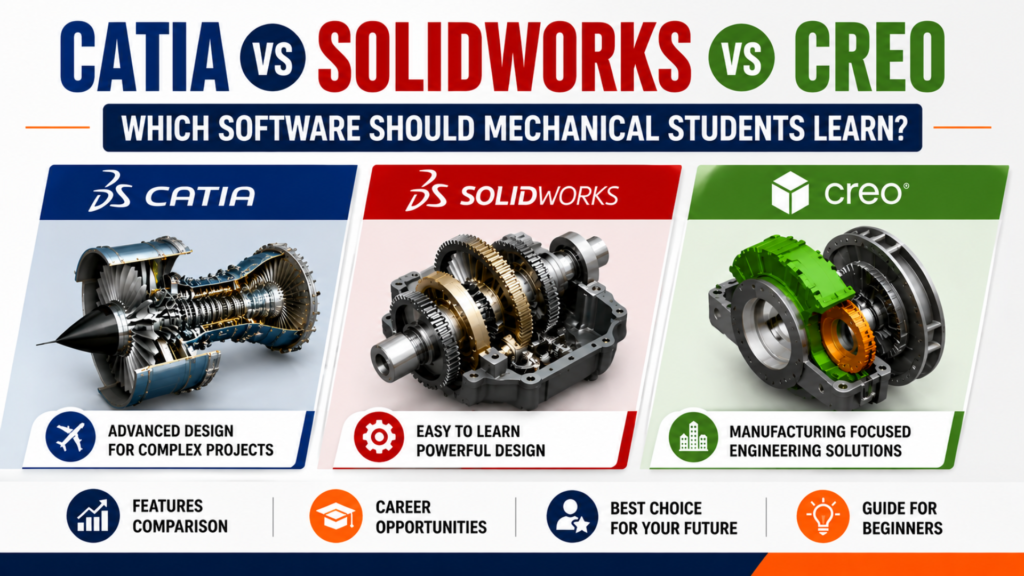
Mechanical engineering is no longer limited to theoretical concepts and manufacturing processes. Today’s industries expect engineers to design innovative products, simulate real-world conditions, optimize manufacturing, and collaborate digitally with global engineering teams. As a result, Computer-Aided Design (CAD) software has become one of the most important technical skills for every mechanical engineering student. Whether you dream of designing automobiles, aircraft, industrial machines, robotics, consumer products, or heavy equipment, your journey starts with mastering professional CAD software.
However, one question troubles almost every mechanical engineering student:
Should I learn CATIA, SolidWorks, or Creo?
All three are globally recognized CAD platforms used by leading engineering organizations. Each software offers powerful design capabilities, but they differ in terms of learning curve, industry adoption, features, and career opportunities. Choosing the right software depends on your career goals, the industry you want to work in, and the type of products you wish to design. Learning the appropriate software can significantly improve your chances of securing internships, campus placements, and high-paying mechanical design jobs.
If you are searching for the CATIA vs SolidWorks vs Creo training institute in Hyderabad, this comprehensive guide by Caddesk Hyderabad will help you understand the strengths, limitations, career prospects, and practical applications of each software so you can make the right decision.
The manufacturing industry has transformed rapidly with the adoption of digital engineering technologies. Today, almost every product begins its lifecycle as a digital 3D model before moving into manufacturing. From concept development and prototyping to simulation and production, CAD software plays a vital role in every stage of product development.
This shift has increased the demand for engineers who possess practical CAD skills rather than just theoretical knowledge. Employers are looking for candidates who can contribute to live engineering projects from day one, making CAD proficiency a valuable asset.
Learning professional CAD software allows students to:
These skills are highly valued in industries such as automotive, aerospace, consumer products, industrial machinery, medical devices, defense, and manufacturing.
This is why students increasingly enroll in the CATIA vs SolidWorks vs Creo training institute in Hyderabad to gain practical experience before entering the job market.
Before comparing CATIA, SolidWorks, and Creo, it’s important to understand that all three software packages are based on the concept of parametric 3D modeling. This means that every feature—such as an extrusion, hole, fillet, or chamfer—is linked through parameters. If one dimension changes, the entire model updates automatically while preserving the design intent.
Although the software interfaces differ, the core engineering principles remain the same. Learning one CAD platform also makes it easier to transition to another later in your career.
The key differences lie in:
Understanding these differences will help you choose the right learning path.
CATIA (Computer-Aided Three-Dimensional Interactive Application) is a powerful engineering design platform developed by Dassault Systèmes, a company known for advanced engineering and product lifecycle solutions. CATIA is considered one of the most advanced CAD software packages available today. It is widely used by multinational companies that design highly complex products involving thousands of components.
Unlike entry-level CAD software, CATIA provides an integrated environment where engineers can perform concept design, advanced surface modeling, assembly design, kinematic analysis, manufacturing planning, and product lifecycle management within a single platform. Best Catia Training Institute in Hyderabad.
Its ability to manage extremely large assemblies while maintaining design accuracy makes it the preferred choice for industries such as automotive and aerospace.
Key Features of CATIA
CATIA is extensively used in industries where product complexity is exceptionally high.
Some of the major sectors include:
Many global automobile manufacturers rely on CATIA because of its ability to handle millions of interconnected design features without compromising accuracy.
Learning CATIA provides several career advantages, especially for students interested in high-end engineering design.
Some major benefits include:
Industry Recognition
CATIA is accepted globally by leading engineering companies, making it an excellent addition to your resume.
Excellent Surface Modeling
Automotive body panels, aircraft wings, consumer products, and aerodynamic components require advanced surfacing tools that CATIA performs exceptionally well.
Large Assembly Management
Complex products often consist of thousands of components. CATIA efficiently manages these assemblies without affecting system performance.
Integrated Engineering Environment
Design, simulation, manufacturing, and product lifecycle management can all be handled within one ecosystem.
Better Career Opportunities
Mechanical engineers with CATIA expertise are often preferred for roles in automotive, aerospace, and advanced product development industries.
SolidWorks is one of the world’s most widely used 3D CAD software applications, developed by Dassault Systèmes. Since its launch in 1995, it has become the preferred choice for millions of engineers, product designers, and manufacturing professionals because of its user-friendly interface, powerful modeling capabilities, and extensive industry adoption. Unlike CATIA, which is primarily designed for enterprise-level product development, SolidWorks focuses on making professional CAD accessible to a broader range of users. It provides an ideal balance between ease of learning and advanced engineering functionality. Best Solidworks training institute in Hyderabad
Today, SolidWorks is used by startups, SMEs, multinational companies, educational institutions, and R&D organizations across the world. For students beginning their CAD journey, SolidWorks is often considered one of the best software platforms because it allows them to understand engineering design concepts quickly while working on real-world projects.
Students who are looking for the CATIA vs SolidWorks vs Creo training institute in Hyderabad often start with SolidWorks because it builds a strong foundation before moving to more advanced software like CATIA or Creo.
SolidWorks offers a comprehensive range of design and engineering tools, including:
Parametric 3D Modeling
Create intelligent 3D models where every feature is linked to dimensions and design intent.
Assembly Design
Develop complex mechanical assemblies by combining multiple components while checking for interference and proper fit.
Engineering Drawings
Generate manufacturing-ready 2D drawings directly from 3D models with automatic updates whenever the design changes.
Sheet Metal Design
Design sheet metal parts with bend allowances, flat patterns, and manufacturing documentation.
Weldments
Create structural frames and welded assemblies efficiently using predefined profiles.
Motion Simulation
Analyze the movement of mechanical assemblies to understand how components interact before manufacturing.
Basic Simulation
Evaluate stress, displacement, and other mechanical behaviors to improve product performance.
Rendering
Produce realistic product images for presentations, client approvals, and marketing purposes.
SolidWorks has one of the broadest user bases among mechanical CAD software. It is widely adopted across industries because it combines powerful features with ease of use.
Common industries include:
Many small and medium-sized companies prefer SolidWorks because it offers professional design capabilities while remaining accessible to engineering teams.
Beginner Friendly
The interface is intuitive and easy to understand, making it ideal for students and fresh graduates.
Fast Design Workflow
Creating sketches, features, assemblies, and drawings is straightforward, allowing engineers to complete projects quickly.
Strong Community Support
Because SolidWorks is widely used, there are thousands of tutorials, forums, certification programs, and learning resources available online.
High Industry Demand
Companies across manufacturing, automation, and product design frequently recruit engineers with SolidWorks skills.
Excellent Certification Programs
SolidWorks certifications such as CSWA and CSWP help students validate their skills and improve employability.
Creo, developed by PTC (Parametric Technology Corporation), is another leading mechanical CAD software used by engineering organizations worldwide. Creo evolved from Pro/ENGINEER, one of the earliest parametric CAD systems, and has continued to expand with powerful tools for product design, simulation, additive manufacturing, and model-based definition.
Creo is particularly well known for its robust parametric modeling, manufacturing-oriented workflows, and ability to handle engineering changes efficiently. Companies that manufacture industrial machinery, automotive components, consumer products, and heavy equipment often rely on Creo for product development. Best Creo training institute in Hyderabad.
Students searching for the CATIA vs SolidWorks vs Creo training institute in Hyderabad should understand that Creo is especially valuable for careers in manufacturing engineering and industrial product development.
Parametric Modeling
Create intelligent models that automatically update whenever design dimensions are modified.
Advanced Assembly Design
Develop large assemblies while maintaining excellent performance.
Flexible Modeling
Modify imported CAD models without rebuilding the entire design.
Sheet Metal Design
Generate manufacturing-ready sheet metal components efficiently.
Mechanism Design
Simulate the movement of mechanical systems before manufacturing.
Additive Manufacturing Support
Prepare components for 3D printing using dedicated design tools.
Model-Based Definition (MBD)
Communicate manufacturing information directly within the 3D model, reducing dependence on traditional drawings.
Creo is commonly adopted in industries requiring precision engineering and complex manufacturing workflows.
These include:
Because Creo integrates well with engineering change management and manufacturing processes, it is widely used in organizations with structured product development systems.
Excellent Parametric Design
Creo is known for its highly reliable parametric modeling capabilities.
Manufacturing Integration
The software supports manufacturing-oriented design processes, making it useful for production environments.
Strong Large Assembly Performance
Complex industrial equipment with numerous components can be managed efficiently.
Engineering Change Management
Design modifications can be implemented systematically without affecting the overall product structure.
Future-Ready Technology
Creo includes tools for additive manufacturing, simulation, and model-based engineering, helping engineers adapt to modern manufacturing practices.
For most students, the learning experience depends on prior exposure to engineering drawing and CAD concepts.
SolidWorks
SolidWorks is the easiest software to learn because of its intuitive interface, logical workflow, and extensive educational resources. Beginners can become productive relatively quickly by practicing sketches, part modeling, and assemblies. Solidworks Course in Hyderabad
Creo
Creo requires a stronger understanding of parametric design principles. While the interface is more technical, it rewards users with robust engineering capabilities suited to manufacturing environments. Creo Course in Hyderabad
CATIA
CATIA has the steepest learning curve. Its advanced modules and enterprise-focused tools make it ideal for complex product development, but beginners may need more time to become comfortable with its interface and workflows. Catia Course in Hyderabad
The “best” software depends on your career goals rather than a universal ranking.
The manufacturing industry is undergoing a major transformation driven by automation, Industry 4.0, electric vehicles (EVs), advanced manufacturing, and digital product development. As a result, companies are increasingly looking for engineers who can contribute to product design from the very beginning of the development cycle. A mechanical engineering degree provides the theoretical foundation, but proficiency in professional CAD software demonstrates that you can apply those concepts to real-world engineering problems. Whether you choose CATIA, SolidWorks, or Creo, developing practical design skills can significantly improve your employability and prepare you for a wide range of engineering roles.
Students searching for the CATIA vs SolidWorks vs Creo training institute in Hyderabad often do so because they understand that CAD software is now considered a core skill for modern mechanical engineers.
CATIA is widely used in industries that develop highly complex products such as automobiles, aircraft, and heavy machinery. Engineers with CATIA expertise are often involved in advanced product design, body engineering, and large-scale assemblies.
Common Job Roles
Professionals working with CATIA are typically involved in concept development, detailed engineering, design modifications, and collaboration with manufacturing teams.
SolidWorks is one of the most versatile CAD software platforms and is widely used across manufacturing industries. Because of its broad adoption, engineers with SolidWorks skills can explore opportunities in both small companies and multinational organizations.
Popular Career Options
SolidWorks is particularly valuable for students interested in product development, machine design, industrial automation, and startup environments.
Creo is commonly used in industries that require precision engineering and manufacturing-focused workflows.
Career Opportunities
Creo is especially suitable for engineers who want to work in industrial manufacturing environments.
Different organizations choose CAD software based on the complexity of their products, existing engineering systems, and business requirements.
Companies That Commonly Use CATIA
These organizations often require engineers to work on highly complex assemblies, advanced surfacing, and integrated product lifecycle management.
Companies That Commonly Use SolidWorks
SolidWorks is popular among organizations involved in:
Its ease of use and flexibility make it a preferred choice for businesses that require efficient product development.
Companies That Commonly Use Creo
Creo is widely adopted in:
Organizations that emphasize manufacturing integration and engineering change management often prefer Creo.
Choosing the right software depends on your long-term career aspirations.
If You Want a Career in Automotive Engineering
CATIA is an excellent choice because it is extensively used in vehicle design, body engineering, and advanced product development.
If You Want to Work in Product Design
SolidWorks is often the preferred option due to its intuitive interface, widespread adoption, and versatility.
If You Want a Career in Manufacturing
Creo provides strong manufacturing-oriented capabilities and is well suited for industrial product development.
If You Are Completely New to CAD
For beginners, the recommended learning sequence is:
This progression helps students build confidence while gradually moving toward advanced engineering applications.
Many students enrolling in the CATIA vs SolidWorks vs Creo training institute in Hyderabad follow this structured roadmap because it develops both technical knowledge and practical design skills.
Absolutely.
In fact, many experienced mechanical engineers are proficient in multiple CAD platforms. Understanding more than one software increases your adaptability and expands your career opportunities.
A suggested progression could be:
Because all three platforms use parametric modeling principles, learning additional software becomes much easier once you have mastered the fundamentals.
Learning CAD software alone is valuable, but combining it with related engineering skills makes you even more competitive in the job market.
Consider developing expertise in:
These complementary skills demonstrate a deeper understanding of the complete product development process.
Selecting the right training institute is just as important as selecting the right software.
At Caddesk Hyderabad, the focus is on developing practical engineering skills rather than only teaching software commands. The training is designed to bridge the gap between academic learning and industry requirements, helping students become job-ready.
If you are searching for the CATIA vs SolidWorks vs Creo training institute in Hyderabad, Caddesk Hyderabad provides a structured learning environment that combines theoretical concepts with hands-on practice.
Industry-Oriented Curriculum
Courses are designed to reflect real-world engineering workflows and current industry expectations.
Experienced Trainers
Learn from instructors with practical experience in mechanical design and CAD applications.
Hands-On Practice
Every concept is reinforced through exercises, assignments, and practical modeling sessions.
Real-Time Projects
Students work on projects that simulate industrial design scenarios, helping them build confidence and practical experience.
Portfolio Development
A strong portfolio showcasing design projects can make a significant difference during interviews. Guidance is provided to help students present their work professionally.
Interview Preparation
Technical interview questions, resume-building tips, and placement support help students prepare for recruitment processes.
Flexible Learning Options
Weekday and weekend batches make it easier for students and working professionals to learn at their convenience.
The role of CAD software continues to expand as engineering embraces digital transformation.
Emerging technologies include:
Digital Twins
Virtual models of physical products are increasingly used to monitor performance, predict maintenance, and improve designs throughout a product’s lifecycle.
Generative Design
AI-assisted design tools can generate multiple design alternatives based on specified constraints, helping engineers explore innovative solutions.
Additive Manufacturing
As 3D printing becomes more common, CAD software plays an important role in designing lightweight, optimized, and manufacturable components.
Cloud Collaboration
Engineering teams are increasingly collaborating through cloud-based platforms, enabling real-time design reviews and version management across different locations.
Model-Based Definition (MBD)
Manufacturing information is gradually moving from traditional 2D drawings to embedded 3D model annotations, improving communication and reducing errors.
Mechanical engineers who continuously update their CAD skills will be well-positioned to adapt to these evolving industry trends.
There is no universal winner because each software serves different engineering needs.
Choose CATIA if:
Choose SolidWorks if:
Choose Creo if:
1. Which is better for beginners: CATIA, SolidWorks, or Creo?
SolidWorks is generally considered the most beginner-friendly because of its intuitive interface and extensive learning resources. It provides a strong foundation before progressing to more advanced software.
2. Is CATIA better than SolidWorks?
Neither is universally better. CATIA is often chosen for complex automotive and aerospace projects, while SolidWorks is widely used for product design, machine design, and manufacturing.
3. Which CAD software has the highest demand?
Demand varies by industry. CATIA, SolidWorks, and Creo are all widely used in professional engineering environments, and each offers strong career opportunities depending on your specialization.
4. Can I learn CATIA without learning AutoCAD?
Yes. However, understanding engineering drawing concepts and basic CAD principles first can make learning CATIA easier.
5. Is Creo difficult to learn?
Creo has a moderate learning curve. Students with a solid understanding of mechanical engineering fundamentals usually adapt to it successfully with regular practice.
6. Which software is best for automotive engineering?
CATIA is commonly used by automotive manufacturers for vehicle design, body engineering, and advanced product development.
7. Which software is best for product design?
SolidWorks is widely preferred for product design because of its ease of use, efficient workflow, and broad industry adoption.
8. Can I learn all three software packages?
Yes. Many professional design engineers eventually become proficient in multiple CAD platforms. Starting with one and gradually expanding your skills is a practical approach.
9. How long does it take to learn CATIA, SolidWorks, or Creo?
The learning duration depends on your dedication and prior knowledge. With consistent practice and guided training, students can develop a solid working knowledge over a few months.
10. Where can I learn CATIA, SolidWorks, and Creo in Hyderabad?
If you are looking for a CATIA vs SolidWorks vs Creo training institute in Hyderabad, Caddesk Hyderabad offers structured training with practical projects, experienced trainers, and placement-focused guidance to help students build industry-ready CAD skills.
Caddesk Hyderabad Is the Best AutoCAD Training Institute in Hyderabad
Architecture CAD Course: AutoCAD, SketchUp, Revit and Rendering Roadmap | CADDESK Hyderabad Architecture is no
Microsoft Project vs Primavera P6: Which Planning Tool Should Civil Engineers Learn? For a civil
Structural Design Course Roadmap: AutoCAD, STAAD Pro, ETABS and Revit Structure Structural design is one
CATIA Course Scope: Career Uses in Product and Automotive Design The demand for skilled mechanical
Revit Architecture Course: What Civil and Architecture Students Learn If you are a civil engineering
AutoCAD 2D Drafting Skills Required for Construction Drawings When you look at a finished building,
AutoCAD vs Revit: Which Course Should Civil Engineers Learn First? If you are a civil
BIM Course in Ameerpet: Skills, Software and Job Roles Building Information Modeling, commonly known as
AutoCAD Course in Ameerpet: Why Ameerpet Is a Popular Training Location Choosing the right place
Best Mechanical Design Software for Freshers in 2026: A Complete Software Selection Guide Choosing the
7-1-201 To 207 Flat.No.A3 3RD Floor, KVR Enclave, beside Satyam Theatre Road, above Bata Showroom, Ameerpet, Hyderabad, Telangana 500016
Phone : +919985023023