Architecture CAD Course: AutoCAD, SketchUp, Revit and Rendering Roadmap
Architecture CAD Course: AutoCAD, SketchUp, Revit and Rendering Roadmap | CADDESK Hyderabad Architecture is no
For a civil engineer, knowing how to design a structure is only one part of working on a construction project. Once a project moves from drawings to execution, planning becomes equally important.A construction project may involve hundreds of activities, multiple contractors, materials, equipment, labour teams and deadlines. If these activities are not properly planned and monitored, even a technically strong project can face delays and cost overruns.
This is where project management software becomes useful.
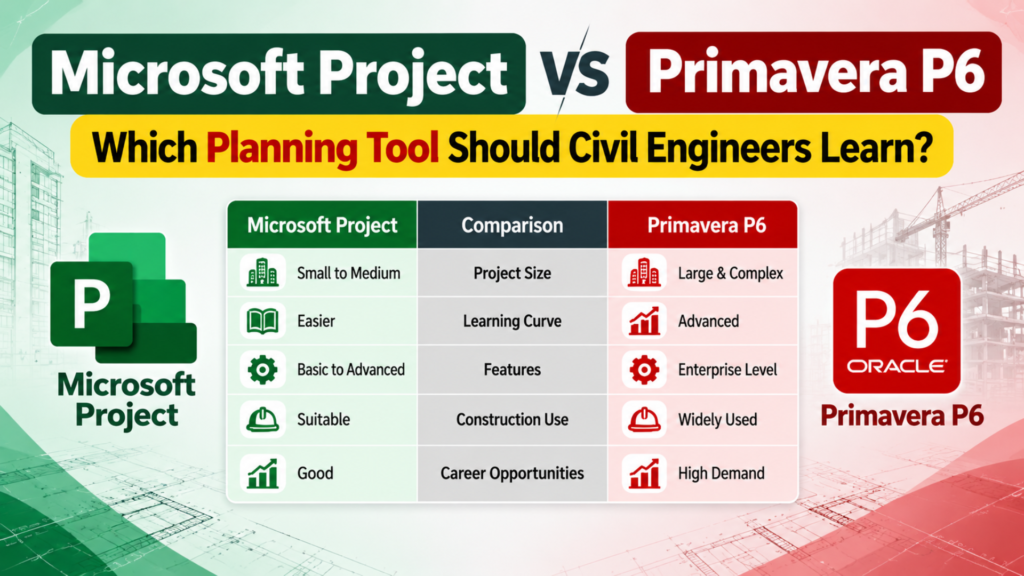
Two of the most commonly discussed planning tools are Microsoft Project (MS Project) and Primavera P6. Both can be used to create schedules, define activities, assign resources and track project progress. However, they are designed with somewhat different users and project environments in mind.
So, if you are a civil engineering student, site engineer, planning engineer or construction professional, an important question is:
Should civil engineers learn MS Project or Primavera P6?
The answer depends largely on the type of projects you want to work on and the role you want to build your career around.In this guide, we will compare Microsoft Project and Primavera P6, explain where each software is commonly used, look at their major differences and help you decide which one you should learn first.
Before comparing the software, it is useful to understand what project planning actually means.
Construction projects consist of many connected activities. For example, a building project may include:
Site preparation
Excavation
Foundation work
Reinforcement
Formwork
Concrete work
Masonry
Plastering
Electrical work
Plumbing
Flooring
Painting
External development
Testing and handover
These activities cannot always happen independently. Some must be completed before others can begin.
For example, you generally cannot start certain masonry activities until the required structural work has progressed. Similarly, finishing activities depend on several preceding construction activities.
A planner needs to determine:
What work needs to be completed?
In what order should it happen?
How long will each activity take?
What resources are required?
Which activities are critical?
What happens if an activity is delayed?
Is the project progressing according to the baseline schedule?
This process is commonly supported by scheduling and project management software such as MS Project and Primavera P6.
Microsoft Project, commonly called MS Project, is Microsoft’s project scheduling and management application.It is designed to help users create project schedules, organise tasks, establish relationships between activities, assign resources and monitor progress.For someone who has already used Microsoft Excel, the interface of MS Project can feel relatively familiar.
A basic construction schedule might include activities such as:
| Activity | Duration | Predecessor |
|---|---|---|
| Site Clearance | 5 days | — |
| Excavation | 10 days | Site Clearance |
| PCC | 4 days | Excavation |
| Reinforcement | 6 days | PCC |
| Formwork | 5 days | Reinforcement |
| Concrete | 2 days | Formwork |
MS Project can then use these relationships to build a schedule and display the activities through a Gantt chart.
Where Is MS Project Useful?
MS Project can be useful for:
Small and medium construction projects
Building projects
Interior projects
Residential developments
Office projects
Infrastructure-related assignments
Engineering teams
General project planning
Organisations already using Microsoft products
It is also useful for learning the fundamentals of project scheduling.
If you are completely new to planning software, MS Project can be a relatively approachable starting point.
Primavera P6 is a professional project planning and scheduling solution from Oracle.It is widely associated with large and complex projects where detailed planning, scheduling, resource management and progress monitoring are important.In the construction and infrastructure sector, Primavera P6 is particularly relevant to planning and scheduling roles.A large project may contain thousands of activities, multiple work packages, several contractors and different project milestones.
Managing such a schedule requires more than simply listing tasks.
The planner may need to work with:
Work Breakdown Structures (WBS)
Activity relationships
Calendars
Baselines
Critical Path
Float
Resources
Constraints
Progress updates
Multiple schedules
Delays and changes
Cost and schedule analysis
This is where Primavera P6 becomes particularly useful.
Primavera P6 is commonly associated with complex projects such as:
High-rise construction
Large commercial buildings
Roads and highways
Metro projects
Airports
Industrial projects
Oil and gas projects
Power projects
Infrastructure development
EPC projects
Large engineering projects
For civil engineers planning to work as Planning Engineers, Project Controls Engineers or Schedulers, Primavera P6 is an especially valuable skill.
The simplest way to understand the difference is to look at the scale and complexity of the project.
MS Project is often a good fit for straightforward project planning and smaller or medium-sized projects.
Primavera P6 is generally more suitable when project schedules become large, complex and highly controlled.
However, this does not mean that one software is universally better than the other.
The right choice depends on the job.
For example, a civil engineer working on a small building project may find MS Project perfectly adequate.
On the other hand, a planning engineer working on a large infrastructure project may need Primavera P6 because of the complexity of the schedule and reporting requirements.
One of the biggest advantages of MS Project is that it helps civil engineers understand the fundamentals of scheduling.
You can learn how to:
Create activities
Set durations
Link activities
Create calendars
Assign resources
Build a baseline
Track actual progress
Identify delays
View Gantt charts
Understand project timelines
These concepts are important even if you eventually move to Primavera P6.
For a civil engineering student who has never worked with scheduling software, learning MS Project can therefore be a useful introduction to project planning.It teaches you to think about a project as a connected sequence of activities rather than just individual construction tasks.
Primavera P6 becomes particularly valuable when your career moves towards professional planning and project controls.
Suppose you are working on a large highway project.
There may be separate activities for:
Earthwork
Embankment
Subgrade
Drainage
Culverts
Bridges
Pavement
Road furniture
Utilities
Traffic management
Each section may contain hundreds of activities.There may also be multiple contractors working simultaneously.The schedule therefore needs a clear structure.Primavera P6 can help planners organise this information using WBS, activity codes, calendars, relationships, resources and baselines.This is one reason Primavera P6 is frequently associated with professional planning roles in construction and infrastructure.
If your career goal is specifically to become a Planning Engineer, Primavera P6 should generally be high on your learning list.Planning engineers are expected to understand more than software operation.They need to understand how construction activities are planned, scheduled, monitored and reported.
A good planning engineer should understand:
Construction sequencing
Project scheduling
Critical path
Baseline schedules
Progress measurement
Delay analysis
Resource planning
Schedule updating
Reporting
Primavera P6 can support many of these activities.However, learning P6 without understanding construction planning is not enough.The software is a tool.Your construction knowledge is what allows you to use the tool effectively.
For a small or medium-sized building project, MS Project can be a practical option.Imagine a contractor managing a residential apartment project with a manageable number of activities.
The team may need:
A project schedule
Gantt chart
Activity dependencies
Basic resource planning
Progress updates
Project deadlines
MS Project can handle these requirements effectively.In such cases, using a highly complex planning environment may not always be necessary.Therefore, project size should influence your choice.
For large and complex construction projects, Primavera P6 is often the stronger choice.
Consider a major infrastructure project involving:
Multiple contractors
Thousands of activities
Several milestones
Different work packages
Complex dependencies
Detailed progress tracking
Resource requirements
Baseline comparisons
A professional scheduling tool becomes extremely important.Primavera P6 is designed with this type of project environment in mind.This is why many civil engineering professionals who want to enter large infrastructure, EPC or project controls environments choose to learn P6.
When comparing a Microsoft Project Course vs Primavera P6 Course, don’t choose simply because one software appears more popular.
Think about the job you want after completing the course.
Choose MS Project if:
You are completely new to project scheduling.
You want to understand scheduling fundamentals.
You work on small or medium projects.
Your organisation uses Microsoft tools extensively.
You want a relatively easy entry point into project planning.
Choose Primavera P6 if:
You want to become a Planning Engineer.
You are targeting infrastructure projects.
You want to work on large construction projects.
You are interested in EPC or project controls.
You want to work with complex project schedules.
Your target employers use Primavera P6.
Learn both if:
You want maximum flexibility.
Understanding both applications allows you to adapt to different organisations and project environments.
Not necessarily.
You do not have to become an MS Project expert before learning Primavera P6.If your main career objective is to become a Planning Engineer, you can start directly with Primavera P6.However, learning basic MS Project first can help beginners understand scheduling concepts.
A practical learning sequence could be:
Civil Engineering Fundamentals → Construction Planning → MS Project Basics → Primavera P6 → Advanced Planning & Project Controls
But another perfectly valid route is:
Civil Engineering Fundamentals → Construction Planning → Primavera P6 → Advanced Project Controls
The choice depends on your current knowledge.
Learning software alone will not make you a strong planning professional.
Civil engineers should also understand:
1. Construction Sequencing
You should know how different construction activities depend on each other.
2. Work Breakdown Structure
You need to know how to divide a large project into manageable work packages.
3. Critical Path Method
Understanding the Critical Path Method is essential for professional scheduling.
4. Baseline Management
You should understand how the approved schedule is compared with actual progress.
5. Progress Tracking
A planner needs to understand how actual work is measured against planned work.
6. Delay Analysis
Understanding why a project is delayed is an important planning skill.
7. Excel
Excel remains highly useful for planning, reporting and data analysis.
A planner who understands both scheduling software and Excel can work more effectively with project data.
Civil engineers with project planning knowledge can explore roles such as:
Planning Engineer
Junior Planning Engineer
Project Coordinator
Project Controls Engineer
Scheduler
Construction Planner
Project Planning Executive
Site Planning Engineer
Project Controls Analyst
The exact requirements vary between companies.
Some employers may specifically request Primavera P6, while others may ask for MS Project or general scheduling experience.Therefore, it is useful to check job descriptions for the type of projects and software used by your target employers.
For civil engineering professionals in Hyderabad, the choice should depend on your career objective rather than simply choosing the course with the most familiar software name.If you are looking for an MS Project course in Hyderabad, focus on whether the training covers actual project scheduling rather than only basic software commands.Similarly, if you are searching for a Primavera P6 course in Hyderabad, check whether the course includes practical construction scheduling.
A useful course should ideally cover projects rather than only software menus.
Look for practical exercises involving:
Project creation
WBS
Activity creation
Relationships
Calendars
Resources
Baselines
Updating schedules
Critical path
Progress monitoring
Reports
For civil engineers, construction-based examples are much more useful than generic examples.
Should civil engineers learn MS Project or Primavera P6?
It depends on the career path. MS Project is useful for general project scheduling and smaller or medium-sized projects. Primavera P6 is particularly valuable for complex construction, infrastructure, EPC and project planning roles.
Is Primavera P6 better than MS Project?
Neither software is universally better. Primavera P6 is generally more suitable for complex, large-scale project scheduling, while MS Project can be an effective choice for simpler project environments.
Is MS Project easier than Primavera P6?
For many beginners, yes. MS Project generally provides a more approachable introduction to project scheduling. Primavera P6 has a steeper learning curve because it is commonly used for more complex planning environments.
Can a civil engineer get a job after learning Primavera P6?
Primavera P6 can strengthen a civil engineer’s profile for planning and scheduling roles, but software knowledge alone does not guarantee employment. Employers also look for construction knowledge, scheduling concepts, project experience and other technical skills.
Is Primavera P6 useful for Planning Engineers?
Yes. Primavera P6 is highly relevant to planning and scheduling roles, especially in large construction, infrastructure, EPC and engineering projects.
Should I learn MS Project before Primavera P6?
It is not compulsory. If you already understand construction planning, you can start directly with Primavera P6. Beginners may find MS Project useful for learning basic scheduling concepts first.
Which is better for construction projects: MS Project or Primavera P6?
For smaller and relatively straightforward construction projects, MS Project can be sufficient. For large and complex construction projects involving many activities, contractors and work packages, Primavera P6 is often a stronger option.
Is Primavera P6 difficult to learn?
It can initially feel more complex than MS Project, but the difficulty becomes manageable once you understand WBS, activities, relationships, calendars, baselines, critical path and progress updating.
Does learning project management software help civil engineers?
Yes. Scheduling and project management software can complement civil engineering knowledge by helping professionals understand project sequencing, timelines, resources and progress.
Which course should I take in Hyderabad?
Choose based on your career goal. If you want a foundation in scheduling, an MS Project course can be useful. If you are targeting Planning Engineer or project controls roles, a Primavera P6 course may be the more relevant choice.
For civil engineers, learning project-management software is more useful when the training connects the software with actual construction workflows. CADDESK Hyderabad offers training in both Primavera P6 and Microsoft Project, allowing learners to choose a tool based on their career goals.
Here are some reasons students may consider CADDESK Hyderabad:
Caddesk Hyderabad Is the Best AutoCAD Training Institute in Hyderabad
Architecture CAD Course: AutoCAD, SketchUp, Revit and Rendering Roadmap | CADDESK Hyderabad Architecture is no
Microsoft Project vs Primavera P6: Which Planning Tool Should Civil Engineers Learn? For a civil
Structural Design Course Roadmap: AutoCAD, STAAD Pro, ETABS and Revit Structure Structural design is one
CATIA Course Scope: Career Uses in Product and Automotive Design The demand for skilled mechanical
Revit Architecture Course: What Civil and Architecture Students Learn If you are a civil engineering
AutoCAD 2D Drafting Skills Required for Construction Drawings When you look at a finished building,
AutoCAD vs Revit: Which Course Should Civil Engineers Learn First? If you are a civil
BIM Course in Ameerpet: Skills, Software and Job Roles Building Information Modeling, commonly known as
AutoCAD Course in Ameerpet: Why Ameerpet Is a Popular Training Location Choosing the right place
Best Mechanical Design Software for Freshers in 2026: A Complete Software Selection Guide Choosing the
7-1-201 To 207 Flat.No.A3 3RD Floor, KVR Enclave, beside Satyam Theatre Road, above Bata Showroom, Ameerpet, Hyderabad, Telangana 500016
Phone : +919985023023