
AutoCAD vs Revit: Which Course Should Civil Engineers Learn First?
AutoCAD vs Revit: Which Course Should Civil Engineers Learn First? If you are a civil
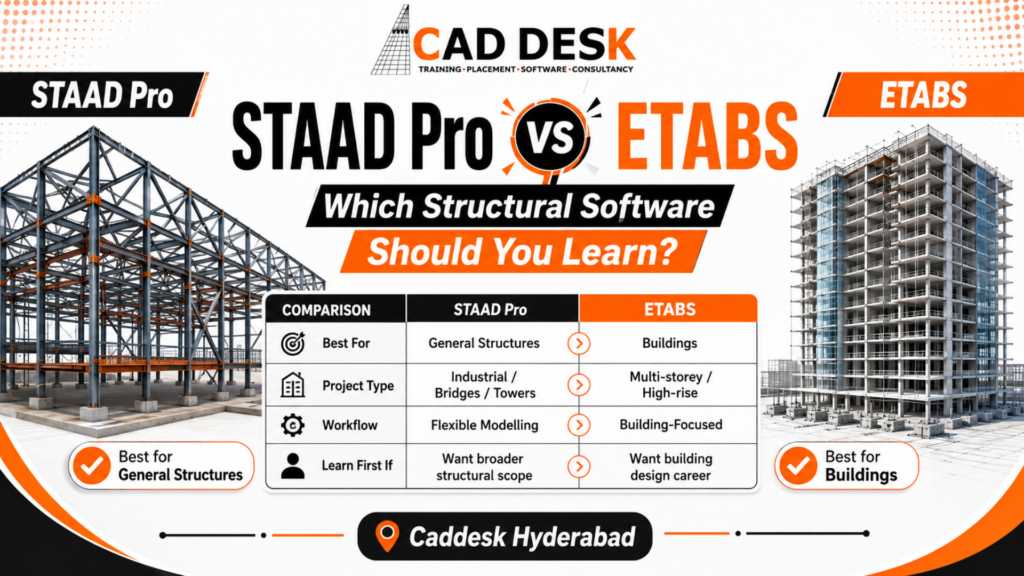
Choosing between STAAD Pro and ETABS is a common challenge for civil engineering students, structural design beginners, and working professionals. Both applications are used for structural modeling, analysis, and code-based design, but they are developed around different project workflows. The direct answer is: learn STAAD Pro when you want to work on a wide variety of structures, and learn ETABS when your main interest is multi-story building analysis and design. For a long-term career in structural design, learning both is useful. However, the software you learn first should depend on the projects and job roles you want to target.
STAAD Pro is Bentley Systems’ general structural finite-element analysis and design application. Bentley describes it as suitable for structures subjected to static, dynamic, wind, earthquake, thermal and moving loads. Its applications include buildings, bridges, towers, industrial facilities and other structural systems. It also supports code-based design and integration with CAD and Bentley structural workflows.
A typical STAAD Pro workflow includes:
Students who want practical, project-based learning can explore the STAAD Pro course in Hyderabad.
ETABS is developed by Computers and Structures, Inc. as an integrated platform for building analysis and design. CSI describes ETABS as a system that combines modelling, analysis, design and reporting. Its knowledge base explains that the software is specifically organised around the grid-like geometry of multi-storey buildings.
ETABS uses building-oriented concepts such as:
These tools make it convenient to create repeated floor plans and study how a building behaves under gravity and lateral loads. For specialised building-design learning, see the ETABS training course in Hyderabad.
1. Difference in Project Applications
The most important difference between STAAD Pro and ETABS is the type of project for which each application is designed. STAAD Pro provides a flexible environment for regular and irregular structural systems. Engineers can use it for buildings, trusses, sheds, towers, industrial frames, equipment-support structures, and projects that may not follow a conventional floor-by-floor layout.
Bentley positions STAAD as a general-purpose structural analysis tool capable of analyzing many structural types under different loading conditions. ETABS is centered on buildings. Its modeling tools and analysis workflows are coordinated around floors, grids, diaphragms, and vertical or lateral building elements.
For residential apartments, commercial buildings, and high-rise structures with repeated stories, ETABS can reduce repetitive modeling and make the model easier to organize and review.
Therefore:
2. Modeling Workflow
STAAD Pro follows a general analytical modeling process. The user creates the structural geometry, connects nodes and members, assigns section and material properties, specifies supports, creates load cases and combinations and then performs the analysis.
This workflow provides considerable control but requires close attention to:
STAAD Pro also allows users to interact with input data, import and export information and connect the structural model with external applications. ETABS organises models through storeys and grid systems. Users can create floor levels, draw or replicate structural elements and work in plan, elevation and three-dimensional views. CSI’s documentation describes a model-initialisation process in which units, properties and loads are established before grids and structural objects are created.
For a conventional multi-storey building, ETABS may feel faster because its interface reflects familiar building drawings. For irregular frames or structures without clear storeys, STAAD Pro may provide a more natural modelling environment.
3. Structural Analysis Capabilities
Both applications perform the core analysis required for structural engineering, but the selected analysis method must match the project.
Bentley states that STAAD can analyse structures under:
Advanced STAAD configurations also provide procedures such as response-spectrum, time-history, pushover and nonlinear analysis.
ETABS supports static and dynamic analysis of building systems. CSI documentation covers modal analysis, response-spectrum analysis, time-history analysis, P-delta effects and static nonlinear pushover analysis. The available capabilities can depend on the selected ETABS product level.
However, software does not make an incorrect model correct.
Incorrect supports, diaphragm assignments, stiffness modifiers, mass sources, member releases or load combinations can produce misleading results even when the program reports that the analysis was completed successfully.
4. Reinforced-Concrete Building Design
ETABS generally provides the more direct workflow for regular reinforced-concrete buildings.
Beams, columns, slabs and shear walls can be organised by storey, and design results can be displayed directly on the analytical model. CSI provides procedures for concrete-frame design and allows users to review design information after completing the analysis.
STAAD Pro can also analyse and design reinforced-concrete frames. It becomes particularly useful when:
This does not mean that ETABS is automatically more accurate than STAAD Pro.
Accuracy depends on the geometry, stiffness assumptions, loading, load combinations, design-code settings and engineering interpretation. The difference is mainly project specialisation and workflow efficiency.
5. Steel and Industrial Structures
STAAD Pro is usually the stronger first choice for students interested in steel and industrial structural design.
Its general modelling approach is suitable for:
Bentley describes STAAD as suitable for buildings, bridges, industrial facilities and other general structural applications.
ETABS includes steel-frame and composite-building design capabilities. It can be relevant for steel or composite high-rise buildings, braced frames and moment-resisting building systems.
However, for a process-plant frame or another non-building industrial structure, STAAD Pro is often more adaptable.
6. Seismic and High-Rise Building Analysis
ETABS is especially convenient for studying multi-storey buildings under lateral loads.
Its building-specific tools help engineers examine:
CSI describes ETABS as a program whose modelling and analysis methods are coordinated with multi-storey building geometry. Its documentation also includes static nonlinear pushover analysis and design procedures for different building systems.
STAAD Pro can also perform seismic and dynamic analysis. It may be particularly useful when the structure is irregular, non-building in nature or part of an industrial or infrastructure project.
The correct software should therefore be selected according to the structure rather than assuming that one program is universally superior.
7. Design Codes and Engineering Standards
Both applications offer code-based structural design workflows.
Bentley states that STAAD can verify structural members against international design codes. STAAD output can also contain references to the code clauses governing a design result.
ETABS provides design procedures for systems such as:
The supported codes and individual capabilities may vary according to the software version and licence level.
For learners in India, software training should be connected with the relevant Indian Standards and project specifications.
Students must understand:
Selecting a code from a software menu is not equal to understanding structural design.
8. Results, Reports and Model Validation
STAAD Pro presents analytical information such as:
ETABS allows users to inspect deformed shapes, force diagrams, load assignments and design information directly on the model. Results can also be reviewed in tabular form, and CSI provides report-generation and Model Explorer tools for navigating analysis data.
In a structural design interview or job, result interpretation is more valuable than memorising commands.
A competent learner should be able to identify:
9. Interoperability and BIM Workflows
Bentley states that STAAD can integrate with CAD tools such as AutoCAD and MicroStation. It can also exchange structural information through Bentley’s Integrated Structural Modeling environment.
ETABS includes import and export tools and works within CSI’s structural software ecosystem. The exact workflow may also involve related applications for slab, foundation or detailed building design.
However, importing a model does not guarantee analytical correctness.
Engineers must check imported models for:
ETABS may feel easier initially for learners who already understand architectural and structural building plans. Stories, grids, and repeated framing are visually familiar. STAAD Pro may demand more attention to analytical modeling because the user works directly with nodes, members, plates, and connectivity. That additional effort can be useful because it teaches how a physical structure is converted into a mathematical model. The easiest software is ultimately the one learned through a complete project. Memorising menu locations without understanding structural behaviour will make either application difficult.
Choose STAAD Pro first when your target work includes:
Choose ETABS first when your target work includes:
Yes. For many structural design roles, STAAD Pro and ETABS are complementary rather than competing skills.
A suitable learning sequence is:
This approach teaches transferable engineering concepts instead of creating dependence on a particular software interface.
A job-oriented STAAD Pro or ETABS course should also cover:
Students should avoid blindly trusting a green color or “pass” status.
Common beginner mistakes include incorrect units, disconnected members, unrealistic supports, wrong load directions, missing self-weight, unsuitable mesh size, and incorrect diaphragm assumptions.
Caddesk Hyderabad offers structural design training for civil engineering students, graduates, and working professionals. Learners interested in varied or industrial structures can begin with the STAAD Pro training course in Hyderabad. Those focused on multi-story building analysis can choose the ETABS training course in Hyderabad. The most valuable training method combines structural fundamentals, live modeling, loading, analysis, design, result verification, and a complete project rather than teaching software commands alone.
Is ETABS better than STAAD Pro?
ETABS is usually more convenient for multi-story building analysis because its workflow is organized around stories, floors, and building components. STAAD Pro is more flexible for a wide range of industrial and non-building structures. The better application depends on the project.
Is STAAD Pro enough for a structural engineering job?
STAAD Pro is a valuable skill, but software knowledge alone is not enough. Employers also look for an understanding of loads, structural behavior, design standards, result interpretation, and structural drawings.
Can ETABS be used for steel structures?
Yes. ETABS includes steel-frame and composite-building design workflows. STAAD Pro may be preferable for irregular industrial steel structures or frames that do not follow a conventional building layout.
Which software is better for high-rise buildings?
ETABS is generally the more convenient choice for high-rise buildings due to its story-based modeling and building-oriented lateral analysis tools.
Can beginners learn both STAAD Pro and ETABS?
Yes, but beginners should first understand the fundamentals of structure and complete one full project in a single application. They can then transfer the same concepts to the second software.
Do STAAD Pro and ETABS give the same results?
They can produce results that are closely comparable when geometry, properties, stiffness, supports, loads, and analysis assumptions are equivalent. Differences should be investigated rather than automatically blamed on the software.
The STAAD Pro vs ETABS decision should be based on your intended project type. STAAD Pro is the stronger first choice for broad structural applications, industrial frames, and irregular systems. ETABS is the stronger first choice for multi-story buildings, high-rise analysis, and building-specific lateral-load workflows. For a stronger structural engineering career, learn one program thoroughly through a complete project and then add the second. When combined with structural fundamentals, design codes, and result verification, STAAD Pro and ETABS become complementary tools rather than competing alternatives.
Choosing the right training institute is important because software development should be learned through practical projects, not just through commands and menus. Caddesk Hyderabad provides through commands and menus. Caddesk Hyderabad provides career-oriented STAAD Pro and ETABS training for civil engineering students, graduates, and working professionals.
Practical, Project-Based Training
Students learn structural modeling, load application, analysis, design, and result interpretation through practical examples. The training focuses on helping learners understand how software is used in real structural engineering projects.
Training from Basic to Advanced Level
The course begins with structural fundamentals and gradually covers advanced topics such as:
Real-Time Structural Projects
Learners work on practical projects such as:
Completing these projects helps students understand the full workflow from structural drawings to final analysis and design reports.
Focus on Structural Concepts
The training does not focus only on operating STAAD Pro or ETABS. Students are also guided on structural behavior, load paths, support conditions, member releases, diaphragm concepts, design codes, and model validation.
This helps learners understand why a structure behaves in a particular way, rather than relying solely on software-generated results.
Manual Verification of Results
Students are trained to review support reactions, bending moments, shear forces, story drift, displacement, and member design results. Basic manual checks are also explained so that learners can identify modeling or analysis errors.
Training for Students and Working Professionals
The courses are suitable for:
Flexible Learning Options
Caddesk Hyderabad offers learning options suitable for students and working professionals. Learners can select appropriate batches based on their availability and training requirements.
Certification and Career Support
After successfully completing the course requirements, learners can receive certification that supports their professional profile. Career guidance may include resume preparation, interview preparation, and information about structural design job roles.
Learn Both STAAD Pro and ETABS
Students can begin with the software most relevant to their career goals and later learn the other applications. This combination prepares learners for both general structural projects and multi-story building design workflows.
Explore the STAAD Pro training course in Hyderabad or the ETABS training course in Hyderabad to select the right structural design learning path.
Caddesk Hyderabad Is the Best AutoCAD Training Institute in Hyderabad
AutoCAD vs Revit: Which Course Should Civil Engineers Learn First? If you are a civil
BIM Course in Ameerpet: Skills, Software and Job Roles Building Information Modeling, commonly known as
AutoCAD Course in Ameerpet: Why Ameerpet Is a Popular Training Location Choosing the right place
Best Mechanical Design Software for Freshers in 2026: A Complete Software Selection Guide Choosing the
Best BIM Training Institute in Hyderabad: How to Choose the Right One Choosing the best
Best AutoCAD Training Institute in Hyderabad: What Students Should Check Before Joining Choosing the best
Mechanical CAD Course in Ameerpet: Software, Skills and Job Roles Build Your Career in Mechanical
BIM Software Roadmap: AutoCAD, Revit, Navisworks & Enscape Building Information Modeling (BIM) has become an
AutoCAD Jobs for Freshers: Roles, Skills and Portfolio Projects Starting a career in design and
Best Mechanical CAD Training Institute in Hyderabad: Student Checklist Choosing the right training institute can
7-1-201 To 207 Flat.No.A3 3RD Floor, KVR Enclave, beside Satyam Theatre Road, above Bata Showroom, Ameerpet, Hyderabad, Telangana 500016
Phone : +919985023023