Architecture CAD Course: AutoCAD, SketchUp, Revit and Rendering Roadmap
Architecture CAD Course: AutoCAD, SketchUp, Revit and Rendering Roadmap | CADDESK Hyderabad Architecture is no
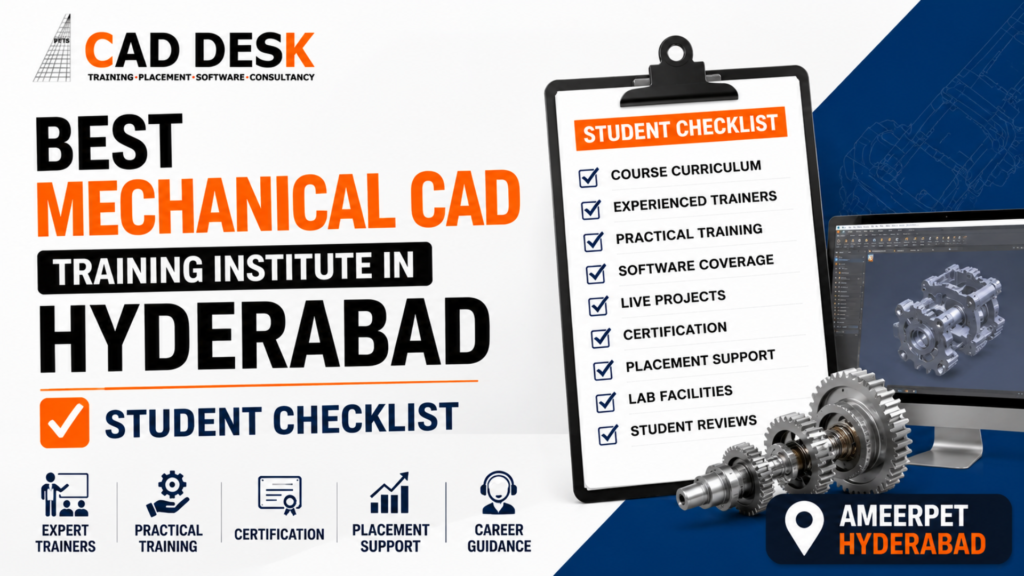
Choosing the right training institute can make a significant difference when you are planning a career in mechanical design, product development, manufacturing, or engineering drafting. Hyderabad has several CAD training centers offering courses in AutoCAD, CATIA, SolidWorks, Creo, NX CAD, GD&T, and other mechanical design tools. With so many options available, students often find it difficult to identify which institute provides genuine practical training, industry-relevant skills, experienced trainers, projects, certification, and career guidance.If you are searching for the best Mechanical CAD training institute in Hyderabad, it is important not to choose an institute only because of advertisements, discounts, course duration, or attractive placement claims. A good Mechanical CAD course should help you understand engineering concepts, develop software skills, work on practical projects, create a professional portfolio, and become confident enough to handle real-world design requirements.This buying guide provides a practical checklist that students can use before joining a Mechanical CAD training program. It also explains what you should check about the curriculum, trainers, software, projects, learning environment, certification, placement assistance, fees, and overall career support.For students considering CADDESK Hyderabad, this checklist can also help you understand what to evaluate before making your final training decision.
Mechanical CAD is not simply about learning where to click inside a software application. Professional mechanical design requires an understanding of engineering drawings, dimensions, tolerances, materials, manufacturing processes, assemblies, modeling techniques, and design standards.A student may complete a software course but still struggle during an interview if they cannot explain how a component was designed or why a particular modeling approach was used.
Therefore, when searching for the best Mechanical CAD training institute in Hyderabad, look beyond the software name. Evaluate whether the institute teaches the complete workflow from engineering fundamentals to practical design.
A strong training program should gradually take you through:
The objective should be to make you capable of applying your knowledge rather than simply completing a syllabus.
Before paying the course fee, use the following checklist. It can help you compare different institutes in Hyderabad objectively.
1. Check the Mechanical CAD Course Curriculum
The first thing you should examine is the curriculum.
Do not select an institute simply because it offers a popular CAD software. Ask for the complete course syllabus and understand what will actually be covered during the training.
A Mechanical CAD program may include software such as:
The exact software you need depends on your career objective. A mechanical design student may require different skills from someone interested in manufacturing, product design, tooling, or engineering documentation.
When comparing the best Mechanical CAD training institute in Hyderabad, check whether the curriculum includes both software skills and practical engineering knowledge.
Ask these questions before joining:
A clearly structured curriculum is generally a better indicator than a course advertisement listing dozens of software names without explaining how they will be taught.
2. Verify the Software Training
Mechanical CAD professionals use specialized software to create, modify, document, and manage engineering designs.
If you are searching for the best Mechanical CAD training institute in Hyderabad, verify exactly which software versions and features students will learn.
For example, learning only basic commands may not be enough for a student targeting mechanical design jobs. You should understand how to create components, modify designs, develop assemblies, generate drawings, and document your work.
Ask the institute for a demonstration class if possible.
During the demo, observe whether the trainer explains:
Good Mechanical CAD training should explain both the software operation and the reason behind the design process.
3. Check the Trainer’s Industry and Teaching Experience
A good software does not automatically create a good training program. The trainer plays an important role in your learning experience.
When comparing the best Mechanical CAD training institute in Hyderabad, find out who will actually teach your batch.
Ask about:
An experienced trainer should be able to answer questions beyond basic commands.
For example, if you ask why a particular feature should be modeled using one method instead of another, the trainer should be able to explain the practical reasoning.
The trainer should also encourage students to ask questions and solve problems independently.
4. Look for Practical, Hands-On Training
One of the most important factors in Mechanical CAD education is practical exposure.
You can watch hundreds of tutorials online, but professional confidence develops when you actually create models and solve design problems.
Before choosing the best Mechanical CAD training institute in Hyderabad, ask how much classroom time is dedicated to practical work.
A good training structure should include:
Learn → Practice → Apply → Review → Improve
Students should be able to work on exercises after learning each concept.
For example, after learning 3D part modeling, students should not immediately move to the next chapter. They should practice creating multiple components using different modeling techniques.
Practical exercises can include:
The projects should become progressively more complex as your skills improve.
5. Ask About Real-World Projects
Projects are one of the strongest ways to demonstrate Mechanical CAD skills.
When searching for the best Mechanical CAD training institute in Hyderabad, ask how many projects you will complete during the course.
Do not settle for a program where projects are limited to copying simple tutorial models.
A good project should involve a design problem.
For example:
Design a mechanical assembly, create its individual components, assemble them correctly, generate engineering drawings, apply dimensions and tolerances, and prepare the final documentation.
This type of workflow provides much more practical value than simply modeling isolated objects.
Projects can also become valuable portfolio material when applying for internships and entry-level jobs.
6. Check Whether GD&T Is Included
Geometric Dimensioning and Tolerancing, commonly known as GD&T, is an important topic for mechanical engineering and manufacturing professionals.
Many students focus heavily on CAD commands and overlook engineering documentation.
When evaluating the best Mechanical CAD training institute in Hyderabad, check whether the curriculum introduces GD&T concepts.
You should understand the purpose of:
You do not necessarily need to become a GD&T specialist during an introductory CAD course, but understanding the fundamentals can improve your ability to interpret and create engineering drawings.
7. Evaluate the 2D Drafting Training
Although 3D modeling has become extremely important, 2D engineering drawings remain an essential part of mechanical design and manufacturing workflows.
A student searching for the best Mechanical CAD training institute in Hyderabad should therefore check whether the program provides sufficient 2D drafting practice.
You should learn how to create and interpret:
The ability to convert a 3D model into useful engineering documentation is an important professional skill.
8. Check the Assembly Modeling Training
Mechanical products often consist of multiple components rather than a single part.
For this reason, assembly modeling is another important area to evaluate.
When comparing the best Mechanical CAD training institute in Hyderabad, ask whether students receive practical assembly training.
You should understand concepts such as:
Working with assemblies also helps students understand how individual components interact within a larger mechanical system.
9. Ask About Class Size and Individual Attention
Classroom size can influence the quality of your learning experience.
If there are too many students in a batch, it may become difficult for the trainer to address individual questions.
Before joining the best Mechanical CAD training institute in Hyderabad, ask about the average batch size.
Also check whether students can:
Mechanical CAD involves a lot of practical work. Individual feedback can help identify errors that students may otherwise continue repeating.
10. Check the Computer Lab and Learning Environment
CAD software can require capable computer systems, particularly when students work with large assemblies or complex 3D models.
Visit the institute if possible and inspect the training environment.
Check:
A professional learning environment can make practical sessions more productive.
If you are evaluating CADDESK Hyderabad or another institute, it is worth visiting the center rather than making a decision based entirely on an online advertisement.
11. Verify Whether Students Get Enough Practice Time
Mechanical CAD skills improve through repetition.
A two-hour classroom lecture is not enough if students do not get opportunities to practice.
Ask whether the institute provides additional lab practice or assignments.
A strong program should encourage students to repeat workflows until they become comfortable.
For example, students should practice:
The more problems you solve, the more confident you become.
12. Check the Certification Details
Certification can be useful when you are starting your career, but you should understand what the certificate represents.
When searching for the best Mechanical CAD training institute in Hyderabad, ask:
Remember that certification should complement your skills rather than replace them.
Employers may ask you to demonstrate your CAD knowledge through technical questions, design tests, or practical assignments.
13. Evaluate Placement Assistance Carefully
Placement assistance is another major factor for students.
However, students should distinguish between placement assistance and guaranteed employment.
Before joining the best Mechanical CAD training institute in Hyderabad, ask what type of career support is actually provided.
Useful placement support may include:
Ask for clear information rather than relying only on promotional statements.
If an institute claims to provide placement support, understand the process and what students are expected to do themselves.
14. Look at Student Projects and Portfolios
One of the easiest ways to understand the quality of practical training is to look at previous student work.
Ask to see examples of:
When comparing the best Mechanical CAD training institute in Hyderabad, student work can provide useful information about the actual learning outcomes.
If every project looks like a basic tutorial exercise, ask whether the course includes more advanced practical assignments.
15. Check Student Reviews Carefully
Online reviews can help, but do not depend on ratings alone.
When researching the best Mechanical CAD training institute in Hyderabad, read reviews to identify recurring patterns.
Look for comments about:
Try to identify detailed reviews rather than relying exclusively on one-line ratings.
A review saying “excellent institute” provides limited information. A detailed review explaining what the student learned and how the training helped them provides more useful insight.
16. Compare Course Duration
Course duration should be realistic for the syllabus.
A very short course may be attractive because it costs less and takes less time, but students may not receive enough practice.
On the other hand, a longer course is not automatically better.
When comparing the best Mechanical CAD training institute in Hyderabad, compare:
Instead of asking only, “How many months is the course?”, ask, “How much useful learning will I receive during those months?”
17. Compare Fees Based on Value
Course fees are naturally important when selecting an institute.
However, the cheapest option may not always provide the best value.
Instead of comparing only the price, compare what is included.
For example:
| Feature | Institute A | Institute B | Institute C |
|---|---|---|---|
| CAD Software Training | ✓ | ✓ | ✓ |
| Practical Projects | ? | ✓ | ? |
| GD&T Basics | ? | ✓ | ? |
| Engineering Drawings | ✓ | ✓ | ✓ |
| Portfolio Support | ? | ✓ | ? |
| Interview Preparation | ? | ✓ | ? |
| Lab Practice | ? | ✓ | ? |
This type of comparison can help you identify which institute provides better overall value.
The right question is not simply “Which Mechanical CAD course is cheapest?”
Instead ask:
“Which Mechanical CAD course gives me the skills I need for my career?”
18. Check Whether the Course Matches Your Career Goal
Different students have different career objectives.
You may want to become a:
Your course should align with your target role.
If you want to work in mechanical product design, prioritize 3D modeling, assemblies, engineering drawings, GD&T, and design projects.
If you are interested in manufacturing, understanding drawings, tolerances, materials, and production-related workflows becomes particularly valuable.
Therefore, the best Mechanical CAD training institute in Hyderabad for one student may not necessarily be the best choice for another student. Your decision should be based on your career objective.
19. Ask About Career Guidance
Students often know which software they want to learn but do not know what job role they should target.
A good training institute can help students understand the relationship between skills and career opportunities.
Before joining the best Mechanical CAD training institute in Hyderabad, ask whether career counseling is available.
Career guidance may help you understand:
This can make the transition from training to employment more structured.
20. Check Whether the Institute Supports Beginners
Not every student joining Mechanical CAD will have the same background.
Some students may have a mechanical engineering degree, while others may be diploma holders, fresh graduates, or professionals looking to upgrade their skills.
If you are a beginner, check whether the institute starts from fundamentals.
The best Mechanical CAD training institute in Hyderabad for beginners should provide a learning path that does not assume advanced software knowledge from day one.
A structured progression can look like:
Engineering Basics → 2D Drafting → 3D Modeling → Assemblies → Drawings → GD&T → Projects → Portfolio → Interview Preparation
This approach can make the learning process easier to follow.
21. Ask About Assignments and Assessments
Assignments provide an opportunity to measure whether you actually understand the concepts.
A training program should ideally include regular practical exercises.
For example:
Assignment 1: Create basic mechanical sketches.
Assignment 2: Develop a 3D component.
Assignment 3: Modify an existing design.
Assignment 4: Create a multi-component assembly.
Assignment 5: Generate an engineering drawing.
Assignment 6: Complete a project independently.
Regular assessment helps students identify areas that require improvement.
22. Check Whether Portfolio Development Is Included
A portfolio can be particularly useful when applying for entry-level mechanical design roles.
Instead of telling an employer, “I know CAD,” you can show your work.
A Mechanical CAD portfolio may contain:
When evaluating the best Mechanical CAD training institute in Hyderabad, check whether trainers help students organize and present their project work professionally.
23. Beware of Common Red Flags
Students should also know what warning signs to look for.
Be careful if an institute:
A professional institute should be transparent about its course, training methodology, fees, certification, and career support.
24. Questions to Ask Before Paying the Course Fee
Before making your final decision, ask the admissions team these questions:
Course
Trainer
Projects
Career
Facilities
Certification
Getting answers to these questions can help you make a more informed decision.
If you are specifically researching CADDESK Hyderabad, evaluate the institute using the same criteria discussed throughout this guide.Instead of choosing an institute simply because it appears in search results for best Mechanical CAD training institute in Hyderabad, look at the actual learning experience.
Consider whether the training provides a combination of:
The strongest training experience should connect classroom learning with practical application.
For students, the objective should be clear: by the end of the course, you should be able to demonstrate what you can design, explain how you created it, and confidently discuss your project during an interview.
Choosing the right best Mechanical CAD training institute in Hyderabad can give students a stronger foundation for building a career in mechanical design, drafting, product development, and manufacturing. The benefits are not limited to learning CAD software; the right training can help students develop practical design skills and understand how CAD is used in professional engineering environments.
1. Build Strong Mechanical Design Skills
A structured Mechanical CAD course helps students understand the complete design process, from creating basic sketches and 2D drawings to developing 3D components and assemblies. This foundation can be useful for students preparing for entry-level CAD and mechanical design roles.
2. Gain Hands-On CAD Experience
Practical training allows students to apply what they learn instead of simply watching demonstrations. Working on assignments, mechanical components, drawings, and projects can improve confidence and help students become more comfortable with CAD software.
3. Learn Industry-Relevant CAD Software
Mechanical design professionals may work with different CAD platforms depending on the company and role. CADDESK Hyderabad’s Mechanical CAD offerings include software and training areas such as AutoCAD Mechanical, CATIA, SolidWorks, Creo, NX CAD and other mechanical design-related tools.
Learning relevant software can help students build a broader technical profile.
4. Improve Engineering Drawing Knowledge
Mechanical CAD training can help students understand dimensions, annotations, layouts, tolerances, sections, part drawings, assembly drawings, and other engineering documentation requirements.
This is particularly useful because mechanical design is not only about creating attractive 3D models. The design must also communicate technical information accurately.
5. Work on Practical Projects
Project-based learning gives students an opportunity to apply multiple CAD concepts together. Instead of learning individual commands separately, students can practice complete workflows involving components, assemblies, drawings, modifications, and documentation.
CADDESK Hyderabad describes its AutoCAD Mechanical training as including practical assignments and real-world mechanical design project examples.
6. Develop a Professional Portfolio
A portfolio can help freshers demonstrate their capabilities during job applications and interviews.
Students can include selected CAD models, engineering drawings, assemblies, and project work to demonstrate what they can actually create.
7. Prepare for Technical Interviews
Mechanical CAD interviews can include questions about software commands, modeling techniques, drawings, design processes, and practical problem-solving.
Training that includes practical projects and trainer guidance can help students explain their work more confidently during interviews.
8. Get Career and Placement Support
Students often need help beyond technical training when they start looking for their first job.
CADDESK Hyderabad states that its training programs include placement assistance and career-oriented support, while its Mechanical CAD-related pages highlight resume, interview, and placement support.
9. Learn From Experienced Trainers
Trainer guidance can make a major difference when students are learning complex CAD workflows.
A knowledgeable trainer can explain not only how to use a particular tool but also why a particular modeling or drafting approach may be appropriate in a practical engineering situation.
10. Get Support While Learning
Mechanical CAD students often face problems while creating models, modifying features, preparing drawings, or working with assemblies.
Ongoing technical support can help students identify mistakes and improve their workflow instead of repeatedly making the same errors.
If you are comparing options for the best Mechanical CAD training institute in Hyderabad, CADDESK Hyderabad can be included in your shortlist based on the training features and support it currently highlights.
Industry-Focused CAD Training
CADDESK Hyderabad offers CAD, CAM and CAE-related training programs designed for engineering students, beginners, and professionals. Its Mechanical CAD category includes specialized training options for mechanical design and related engineering applications.
Practical and Project-Based Learning
One of the important factors students should look for in a best Mechanical CAD training institute in Hyderabad is practical exposure.
CADDESK Hyderabad highlights hands-on assignments and real-world project examples in its AutoCAD Mechanical training. This approach can help students apply classroom concepts to mechanical components, assemblies, manufacturing drawings, and engineering documentation.
Multiple Mechanical CAD Software Options
Mechanical design careers can involve different software platforms. CADDESK Hyderabad lists training options including AutoCAD Mechanical, CATIA, SolidWorks, Creo, NX CAD, ANSYS, HyperMesh and related engineering tools.
This can be useful for students who want to build skills across more than one software platform.
Experienced Trainer Support
CADDESK Hyderabad highlights industry-experienced trainers and personalized practical guidance as part of its training approach.
For beginners, trainer support can be particularly useful because CAD learning involves continuous practice and problem-solving.
Structured Course Materials
Good learning resources can make it easier for students to revise topics after class.
CADDESK Hyderabad lists course materials and reference resources among the benefits available to students.
Certification
Certification can add supporting documentation to a student’s professional profile after completing the required training.
CADDESK Hyderabad highlights ISO and Autodesk certification options and describes industry-recognized certification for relevant courses.
Students should still remember that certification works best when supported by genuine practical CAD skills and project experience.
Placement and Interview Preparation
For students looking for their first CAD job, technical training is only one part of the process.
CADDESK Hyderabad highlights placement assistance, placement training, and career-oriented support.
Students should clarify the exact placement process, eligibility criteria, interview support, and current opportunities before enrolling.
Suitable for Students and Professionals
Mechanical CAD courses can be useful for different learner groups, including mechanical engineering students, diploma holders, fresh graduates, design professionals, and working professionals looking to upgrade their skills.
CADDESK Hyderabad specifically describes its AutoCAD Mechanical training as suitable for mechanical engineering students, diploma holders, design engineers, production engineers, and working professionals.
Classroom and Online Learning Options
Flexible learning can be useful for students and working professionals who cannot attend every session physically.
CADDESK Hyderabad currently provides both classroom and online AutoCAD Mechanical training options, with its online program also offering recorded sessions and flexible learning support.
Convenient Hyderabad Location
CADDESK Hyderabad’s listed Ameerpet center is located at KVR Enclave, above Bata Showroom, beside Asian Satyam Mall and above ICICI Bank, Ameerpet, Hyderabad.
For students comparing institutes, visiting the center before enrollment can help them evaluate the classroom environment, facilities, trainer interaction, and practical learning setup personally.
1. What is Mechanical CAD?
Mechanical CAD refers to the use of computer-aided design software for creating, modifying, documenting, and managing mechanical engineering designs.
Mechanical CAD can be used for 2D drafting, 3D modeling, assemblies, engineering drawings, product design, manufacturing documentation, and related design activities.
2. Who Can Join a Mechanical CAD Course?
Mechanical CAD courses can be suitable for mechanical engineering students, diploma holders, fresh graduates, design engineers, production engineers, and working professionals who want to develop or upgrade their CAD skills.
Beginners should look for a course that starts with fundamentals before progressing to advanced modeling and project work.
3. Which Software Should I Learn for Mechanical CAD?
The right software depends on your career goal and the type of companies or roles you are targeting.
Common Mechanical CAD software includes AutoCAD Mechanical, CATIA, SolidWorks, Creo and NX CAD. CADDESK Hyderabad currently lists several of these tools within its mechanical training offerings.
Instead of trying to learn every software available, identify the role you want and choose the tools that are most relevant to it.
4. Is Mechanical CAD Useful for Mechanical Engineering Students?
Yes. Mechanical CAD can complement an engineering education by helping students convert theoretical engineering concepts into digital drawings and 3D models.
It can also help students develop practical skills that may be useful when applying for internships, entry-level positions, and design-related roles.
5. What Will I Learn in a Mechanical CAD Course?
The exact syllabus varies between institutes, but Mechanical CAD training can cover areas such as:
CADDESK Hyderabad’s AutoCAD Mechanical course describes training in areas including 2D drafting, mechanical components, dimensioning, tolerances, part drawings, assembly drawings, annotations, layouts, plotting, and engineering drawings.
6. Is Practical Training Important in Mechanical CAD?
Yes. Practical training is one of the most important factors to consider when choosing the best Mechanical CAD training institute in Hyderabad.
Regular practice helps students understand how individual commands and tools work together in a complete design workflow.
7. Do Mechanical CAD Courses Include Projects?
This depends on the institute and course.
Students should specifically ask how many projects are included, whether the projects are practical, whether trainers provide feedback, and whether students can use completed projects in their portfolios.
CADDESK Hyderabad highlights practical assignments and real-world mechanical design project examples for its AutoCAD Mechanical training.
8. Can Beginners Learn Mechanical CAD?
Yes. Beginners can learn Mechanical CAD if the course follows a structured learning path.
A beginner-friendly progression can start with basic drafting and modeling concepts before moving into assemblies, engineering drawings, advanced tools, and projects.
9. How Long Does It Take to Learn Mechanical CAD?
The duration depends on the software, course depth, learning format, and student’s previous experience.
CADDESK Hyderabad lists different durations for its individual mechanical-related courses, so students should confirm the current duration, class hours, syllabus, and practical hours for their specific program before enrollment.
10. Does CADDESK Hyderabad Provide Placement Assistance?
CADDESK Hyderabad states that placement assistance and placement-oriented training are available with its courses.
Students should discuss the current placement process, eligibility requirements, interview preparation, and the type of assistance provided before joining.
11. Does CADDESK Hyderabad Provide Certification?
Yes. CADDESK Hyderabad highlights certification options, including ISO and Autodesk certification, depending on the course.
Students should confirm which certification applies to their selected Mechanical CAD program.
12. Can Working Professionals Join Mechanical CAD Training?
Yes. Working professionals can consider Mechanical CAD training if they want to upgrade their technical skills or move toward CAD and design-related roles.
CADDESK Hyderabad offers online and classroom learning options for relevant Mechanical CAD training, which can provide flexibility depending on the student’s schedule.
13. What Jobs Can I Pursue After Mechanical CAD Training?
Depending on your education, skills, experience, software knowledge, and specialization, potential career paths can include:
Additional engineering knowledge, project experience, and interview performance can influence the type of role you qualify for.
14. How Should I Choose the Best Mechanical CAD Training Institute in Hyderabad?
Compare institutes based on:
Do not choose an institute based only on price or advertisements.
15. Should I Attend a Demo Class Before Joining?
Yes, if a demo is available.
A demo class can help you understand the trainer’s teaching style, practical approach, classroom environment, and the level at which the course begins.
CADDESK Hyderabad currently promotes a free demo option for its CAD training programs.
16. Is Certification Enough to Get a Mechanical CAD Job?
No. A certificate can support your profile, but employers may also evaluate your actual technical skills.
You should be able to demonstrate your ability to create drawings, models, assemblies, and projects and explain your design decisions.
Practical knowledge, engineering fundamentals, communication skills, and interview preparation can all contribute to your career development.
Finding the best Mechanical CAD training institute in Hyderabad should be based on more than course fees, advertisements, or the number of software names listed on a brochure. A good Mechanical CAD training program should help you move from basic concepts to practical design skills. It should provide opportunities to work with CAD software, create mechanical components, develop assemblies, prepare engineering drawings, complete practical projects, and build a portfolio that demonstrates your abilities. When comparing institutes, use the student checklist from this guide. Look at the curriculum, trainers, practical training, software coverage, projects, certification, lab facilities, career guidance, interview preparation, and placement assistance. CADDESK Hyderabad can be considered as one of the options when researching Mechanical CAD training in Hyderabad. Its current Mechanical CAD and AutoCAD Mechanical offerings highlight practical training, project-based learning, experienced trainers, course materials, certification, and placement assistance. However, students should always verify the latest syllabus, course duration, fees, batch timings, certification details, and placement process directly with the institute before enrolling.
Caddesk Hyderabad Is the Best AutoCAD Training Institute in Hyderabad
Architecture CAD Course: AutoCAD, SketchUp, Revit and Rendering Roadmap | CADDESK Hyderabad Architecture is no
Microsoft Project vs Primavera P6: Which Planning Tool Should Civil Engineers Learn? For a civil
Structural Design Course Roadmap: AutoCAD, STAAD Pro, ETABS and Revit Structure Structural design is one
CATIA Course Scope: Career Uses in Product and Automotive Design The demand for skilled mechanical
Revit Architecture Course: What Civil and Architecture Students Learn If you are a civil engineering
AutoCAD 2D Drafting Skills Required for Construction Drawings When you look at a finished building,
AutoCAD vs Revit: Which Course Should Civil Engineers Learn First? If you are a civil
BIM Course in Ameerpet: Skills, Software and Job Roles Building Information Modeling, commonly known as
AutoCAD Course in Ameerpet: Why Ameerpet Is a Popular Training Location Choosing the right place
Best Mechanical Design Software for Freshers in 2026: A Complete Software Selection Guide Choosing the
7-1-201 To 207 Flat.No.A3 3RD Floor, KVR Enclave, beside Satyam Theatre Road, above Bata Showroom, Ameerpet, Hyderabad, Telangana 500016
Phone : +919985023023