
Architecture CAD Course: AutoCAD, SketchUp, Revit and Rendering Roadmap
Architecture CAD Course: AutoCAD, SketchUp, Revit and Rendering Roadmap | CADDESK Hyderabad Architecture is no
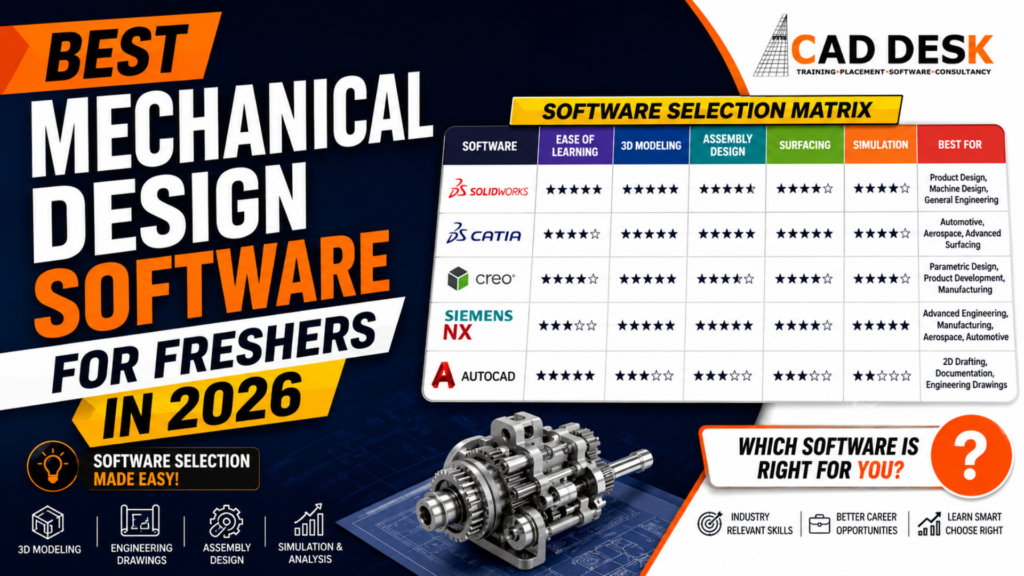
Choosing the right software is one of the first major decisions for students and freshers starting a career in mechanical design. The mechanical engineering industry uses several CAD software platforms, and each one is designed for different applications, industries, and career paths.In 2026, freshers can choose from powerful mechanical design tools such as AutoCAD, SolidWorks, CATIA, Creo, and Siemens NX. While all of these platforms are valuable, learning every software at once is neither practical nor necessary. The better approach is to understand what each tool does, identify the type of mechanical design career you want, and then build your skills step by step.For students looking for the best mechanical course in Hyderabad, software selection is particularly important because employers often evaluate candidates based on both their engineering fundamentals and practical CAD skills.This guide explains the best mechanical design software for freshers in 2026, their major applications, advantages, learning difficulty, and suitable career paths.
For most freshers, SolidWorks is one of the easiest starting points for 3D mechanical design, while AutoCAD is an excellent choice for learning 2D drafting fundamentals.
However, there is no single software that is best for every mechanical engineering career.
A practical selection can look like this:
| Software | Best For | Fresher Friendly | Major Industries |
|---|---|---|---|
| AutoCAD | 2D drafting and documentation | ⭐⭐⭐⭐⭐ | Engineering, construction, manufacturing |
| SolidWorks | 3D mechanical design | ⭐⭐⭐⭐⭐ | Product design, machinery, manufacturing |
| CATIA | Advanced product design and surfacing | ⭐⭐⭐⭐ | Automotive, aerospace |
| Creo | Parametric design and product development | ⭐⭐⭐⭐ | Automotive, manufacturing |
| Siemens NX | Advanced design, manufacturing and engineering | ⭐⭐⭐ | Automotive, aerospace, manufacturing |
For a fresher, the ideal approach is not simply to collect software certificates. Instead, focus on design concepts, engineering drawings, 3D modeling, assemblies, GD&T, design documentation, and real-world projects.
A strong foundation allows you to move from one CAD platform to another much more easily.
Mechanical design has changed significantly with the development of digital engineering workflows.Traditional drafting has increasingly moved toward 3D product development, parametric modeling, simulation, digital manufacturing, and integrated product lifecycle workflows.Companies now expect mechanical design candidates to understand more than basic drawing creation.
A fresher may be expected to work with:
Therefore, selecting the right mechanical design tools can have a direct impact on your learning path and employability.
The best software is the one that matches your target industry and allows you to develop practical design skills.
Before jumping into advanced 3D CAD software, freshers should understand 2D drafting.
AutoCAD
AutoCAD remains one of the most recognizable CAD platforms for drafting and engineering documentation.
For mechanical students, learning AutoCAD can help develop an understanding of:
Although modern mechanical design increasingly relies on 3D modeling, 2D drawings continue to play an important role in manufacturing and engineering documentation.
A fresher who understands how a 3D component is represented in an engineering drawing will generally have a stronger design foundation.
Why Learn 2D CAD?
2D drafting teaches you how engineers communicate design information.
For example, a manufacturing drawing may contain:
A designer needs to understand how these details affect manufacturing.
Therefore, 2D drafting should not be considered an outdated skill. Instead, it should be treated as the foundation for professional mechanical design.
After understanding 2D drafting, the next step is 3D parametric modeling.Parametric modeling allows designers to create models based on dimensions, relationships, features, and design intent.If a dimension changes, the model can automatically update according to the established design relationships.This makes parametric CAD extremely useful for product development.
SolidWorks
SolidWorks is one of the most popular choices for freshers who want to enter mechanical design.
Its interface is relatively approachable, making it suitable for students learning 3D CAD for the first time.
SolidWorks can be used for:
A fresher can begin with simple components such as brackets, shafts, flanges, plates, and housings before moving to complex assemblies.
Why SolidWorks Is Good for Freshers
SolidWorks provides a practical introduction to the concepts used across many other parametric CAD platforms.
You learn concepts such as:
Sketch → Feature → Part → Assembly → Drawing
Once you understand these concepts, transitioning to other CAD platforms becomes easier.
SolidWorks is particularly useful for students interested in:
CATIA is a powerful CAD platform widely associated with advanced product development.It is particularly important in industries where complex products and surfaces need to be designed.Freshers interested in automotive or aerospace engineering may encounter CATIA in professional environments.
CATIA can be used for:
One of CATIA’s major strengths is its ability to handle complex shapes and large product structures.
CATIA for Freshers
CATIA can have a steeper learning curve than simpler CAD applications.
However, students who want to build a career in industries such as:
can benefit significantly from understanding CATIA.
For students targeting automotive design roles, learning CATIA alongside mechanical engineering fundamentals can provide a useful advantage.
Creo is another major mechanical CAD platform used for product development and engineering design.Creo focuses heavily on parametric modeling and design intent.
It can be used for:
Creo is particularly useful for students interested in engineering organizations that rely on structured parametric product development.
Why Freshers Should Consider Creo
Creo teaches important mechanical design concepts that are transferable to other CAD systems.
Students can develop skills in:
If your goal is to become a mechanical design engineer rather than simply learning a CAD interface, understanding these concepts is more important than memorizing individual commands.
Siemens NX is a powerful engineering platform used across advanced product development and manufacturing environments.It combines capabilities across design, engineering, manufacturing, and related workflows.
NX is commonly associated with industries such as:
The platform offers sophisticated tools for:
Should Freshers Learn NX?
Yes, especially if you are targeting companies and industries where NX is part of the engineering workflow.
However, beginners may find it easier to first understand general CAD concepts through a more beginner-friendly platform and then progress toward advanced tools.
The important point is that CAD fundamentals transfer between platforms.
Mechanical CAD is not limited to solid modeling.Surface modeling is particularly important when designing products with complex shapes.Automotive components are a good example.Vehicle exterior panels, dashboards, body components, and other products often require sophisticated surface modeling techniques.
CATIA for Surfacing
CATIA is particularly well known for advanced surfacing capabilities.
Students interested in automotive styling and product development may benefit from learning:
SolidWorks Surfacing
SolidWorks also provides surface modeling tools and can be a good introduction to surface-based design.
Learning basic surfacing concepts before moving into advanced automotive surface workflows can make the learning curve easier.
Why Surfacing Matters
A designer working with complex products must understand the difference between:
Solid modeling and surface modeling.
Solid modeling focuses on creating volumetric objects.
Surface modeling focuses on controlling shapes and faces, particularly when appearance and complex geometry are important.
This distinction becomes increasingly valuable for students interested in automotive, consumer products, and industrial design.
Creating a beautiful 3D model is only one part of mechanical design.A component also needs to perform correctly under real-world conditions.This is where simulation becomes important.
Simulation tools can help engineers investigate questions such as:
Depending on the software and workflow, engineers may perform structural, thermal, motion, or other types of analysis.
Why Freshers Should Learn Basic Simulation
A fresher does not necessarily need to become an expert simulation analyst immediately.
However, understanding basic concepts such as:
can help connect CAD modeling with real engineering.
This makes a candidate more valuable than someone who only knows how to create 3D shapes.
The following comparison can help students decide where to begin.
AutoCAD
Best for: 2D drafting
Ideal learner: Beginner mechanical engineering student
Key skills:
Recommended for: Building drafting fundamentals.
SolidWorks
Best for: Beginner-to-intermediate 3D mechanical design
Ideal learner: Mechanical engineering student or fresher
Key skills:
Recommended for: Freshers entering mechanical design and product development.
CATIA
Best for: Advanced product design and surfacing
Ideal learner: Students targeting automotive/aerospace
Key skills:
Recommended for: Automotive and aerospace-oriented careers.
Creo
Best for: Parametric product development
Ideal learner: Mechanical design students
Key skills:
Recommended for: Engineering and manufacturing careers.
Siemens NX
Best for: Advanced design and manufacturing
Ideal learner: Students targeting advanced engineering environments
Key skills:
Recommended for: Automotive, aerospace, and advanced manufacturing.
A common mistake among freshers is trying to learn five CAD packages simultaneously.
Instead, follow a structured progression.
Stage 1: Engineering Drawing
Start with:
Engineering Drawing → Dimensions → Sections → GD&T → Manufacturing drawings
This gives you the foundation required to understand professional documentation.
Stage 2: 2D CAD
Learn AutoCAD or another suitable 2D drafting platform.
Focus on creating actual engineering drawings rather than simply completing command-based exercises.
Stage 3: 3D Parametric Modeling
Move to SolidWorks, Creo, CATIA, or NX.
Start with:
Then move to assemblies.
Stage 4: Assembly Design
Learn how individual components work together.
Practice:
Stage 5: Drawings
Convert 3D models into manufacturing-ready drawings.
Understand:
Stage 6: Specialization
Now select a specialization based on your career target.
For example:
Automotive → CATIA / Creo / NX
Product Design → SolidWorks / Creo
Manufacturing → NX / Creo / SolidWorks
Drafting → AutoCAD
Complex Surface Design → CATIA
A structured learning roadmap can help avoid confusion.
Month 1: Engineering Drawing + 2D CAD
Learn:
Create at least 10–15 mechanical drawings for practice.
Month 2: 3D Modeling
Learn:
Create components based on real engineering examples.
Month 3: Assemblies + Drawings
Learn:
Create a complete mechanical assembly as a project.
Month 4: Advanced CAD
Depending on your career objective, start learning:
Focus on industry-specific workflows.
Month 5: GD&T + Manufacturing
Learn:
Month 6: Portfolio Development
Build 3–5 strong projects.
Examples include:
A project portfolio demonstrates what you can actually do.
Your target career should determine your software selection.
If You Want to Become a Mechanical Design Engineer
Start with:
SolidWorks + AutoCAD
Then add Creo, CATIA, or NX based on the target companies.
If You Want to Enter Automotive Design
Consider:
CATIA + Creo/NX
Focus heavily on:
If You Want to Work in Manufacturing
Consider:
NX / Creo / SolidWorks
Add knowledge of:
If You Want a Drafting Role
Start with:
AutoCAD + Engineering Drawing + GD&T
Then add 3D CAD skills.
Learning software without understanding engineering is one of the biggest mistakes.
1. Learning Commands Instead of Concepts
Knowing 100 commands does not automatically make someone a good designer.
Understand why and when each tool is used.
2. Collecting Certificates
Certificates can demonstrate training, but employers also want practical skills.
Build projects alongside your training.
3. Ignoring GD&T
Geometric Dimensioning and Tolerancing is highly relevant to manufacturing-oriented mechanical design.
Do not treat it as an optional topic.
4. Ignoring Manufacturing
A design must be manufacturable.
Learn how machining, casting, sheet-metal fabrication, welding, and other processes influence design decisions.
5. Learning Too Many Software Packages at Once
Master one platform first.
Then learn additional software according to your career goals.
CAD software is only one part of a mechanical designer’s skill set.
A strong fresher profile can include:
The combination of software knowledge and engineering understanding is what creates a strong mechanical design professional.
Watching tutorials can introduce you to software, but practical training can help you understand how CAD is actually applied to engineering problems.
A structured mechanical CAD program should ideally include:
For students searching for the Best Mechanical training institute in Hyderabad, it is important to compare institutes based on curriculum, practical exposure, projects, trainer experience, and the software included in the program—not simply the course fee.
Students researching the best mechanical course in Hyderabad can evaluate training programs based on how effectively they combine CAD software with practical mechanical engineering skills.A good training pathway should move from fundamentals to software and finally to projects.At CADDESK Hyderabad, students interested in mechanical CAD can explore training that focuses on developing practical CAD skills relevant to mechanical design careers.When comparing a mechanical CAD course in Hyderabad, look for a program that gives you exposure to the tools employers use while also teaching the engineering concepts behind those tools.
The goal should not simply be:
“I know SolidWorks.”
Instead, your portfolio should demonstrate:
“I can understand a mechanical problem, create the design, develop the 3D model, prepare engineering drawings, apply appropriate tolerances, and communicate the design clearly.”
That difference can be important when applying for entry-level design positions.
Which mechanical design software is best for freshers?
For most freshers, SolidWorks is an excellent starting point for 3D mechanical design because it provides an approachable introduction to parametric modeling, assemblies, and engineering drawings. AutoCAD is useful for learning 2D drafting, while CATIA, Creo, and Siemens NX can be added based on the student’s target industry.
Is AutoCAD enough for a mechanical design job?
AutoCAD can be valuable for drafting roles, but many modern mechanical design positions also require 3D CAD skills. Learning AutoCAD alongside a 3D platform such as SolidWorks, Creo, CATIA, or NX can provide a broader skill set.
Should I learn SolidWorks or CATIA first?
If you are completely new to 3D CAD, SolidWorks can be an easier starting point. If your specific career goal is automotive or aerospace design, CATIA may become particularly important. A good approach is to learn core parametric modeling concepts first and then specialize.
Is CATIA difficult for beginners?
CATIA can have a steeper learning curve because of its extensive capabilities. Beginners can make the process easier by first understanding engineering drawing, sketching, parametric modeling, and assembly concepts.
Is Creo useful for mechanical engineers?
Yes. Creo is widely suited to parametric product design and can be valuable for mechanical engineers working in product development and manufacturing-oriented environments.
Is Siemens NX good for freshers?
Siemens NX is a powerful option for students targeting advanced engineering, automotive, aerospace, and manufacturing environments. Beginners may benefit from developing general CAD fundamentals before moving into more advanced workflows.
How many CAD software packages should a fresher learn?
It is usually better to become proficient in one major 3D CAD platform and one 2D drafting tool before adding another platform. Depth of knowledge is generally more valuable than having superficial familiarity with many applications.
Does CAD software alone guarantee a mechanical design job?
No. CAD is one component of a mechanical design career. Employers may also look for engineering fundamentals, GD&T, manufacturing knowledge, problem-solving ability, project experience, and communication skills.
Choosing the right CAD software is only the first step. The real advantage comes from learning how to use that software on industry-oriented mechanical design projects.If you’re a mechanical engineering student, diploma holder, graduate, or fresher looking to build practical CAD skills, CADDESK Hyderabad can help you turn your software knowledge into job-ready design skills.
With the right training, you can build skills in areas such as:
Instead of learning commands without understanding their application, focus on developing the complete workflow:
Engineering Fundamentals → CAD Software → Practical Projects → Portfolio → Career Preparation
Start Your Mechanical CAD Journey with CADDESK Hyderabad
Looking for the best mechanical course in Hyderabad? Don’t choose a course based only on the software name or certificate. Choose training that helps you understand how mechanical design is actually done in an industry environment.Build your CAD skills. Create real projects. Strengthen your portfolio. Prepare for your mechanical design career.Join CADDESK Hyderabad and take the next step toward becoming a job-ready mechanical design professional.
Ready to start? Contact CADDESK Hyderabad today and explore the right Mechanical CAD training path for your career.
Caddesk Hyderabad Is the Best AutoCAD Training Institute in Hyderabad
Architecture CAD Course: AutoCAD, SketchUp, Revit and Rendering Roadmap | CADDESK Hyderabad Architecture is no
Microsoft Project vs Primavera P6: Which Planning Tool Should Civil Engineers Learn? For a civil
Structural Design Course Roadmap: AutoCAD, STAAD Pro, ETABS and Revit Structure Structural design is one
CATIA Course Scope: Career Uses in Product and Automotive Design The demand for skilled mechanical
Revit Architecture Course: What Civil and Architecture Students Learn If you are a civil engineering
AutoCAD 2D Drafting Skills Required for Construction Drawings When you look at a finished building,
AutoCAD vs Revit: Which Course Should Civil Engineers Learn First? If you are a civil
BIM Course in Ameerpet: Skills, Software and Job Roles Building Information Modeling, commonly known as
AutoCAD Course in Ameerpet: Why Ameerpet Is a Popular Training Location Choosing the right place
Best Mechanical Design Software for Freshers in 2026: A Complete Software Selection Guide Choosing the
7-1-201 To 207 Flat.No.A3 3RD Floor, KVR Enclave, beside Satyam Theatre Road, above Bata Showroom, Ameerpet, Hyderabad, Telangana 500016
Phone : +919985023023