












BIW Fixtures Course in Hyderabad
Home All Courses BIW Fixtures Course Course Includes Time Duration : 40 Days Reference Guides Student Login ISO Certification Pre-Placement Training Best Infrastructure More Courses
Home All Courses GD&T Course Course Includes Time Duration : 40 Days Reference Guides Student Login ISO Certification Pre-Placement Training Best Infrastructure More Courses For
Book A Free Demo Loading… Trusted BY 550+ Leading Companies Are Hiring From Us Hiring clients is selecting and recruiting customers based on their purchasing
Your Skills, Our Commitment – Guaranteed Interview Opportunities! Home Contact Us Skill Up with Caddesk Hyderabad – Interviews Guaranteed The Interview Guarantee Program is designed to


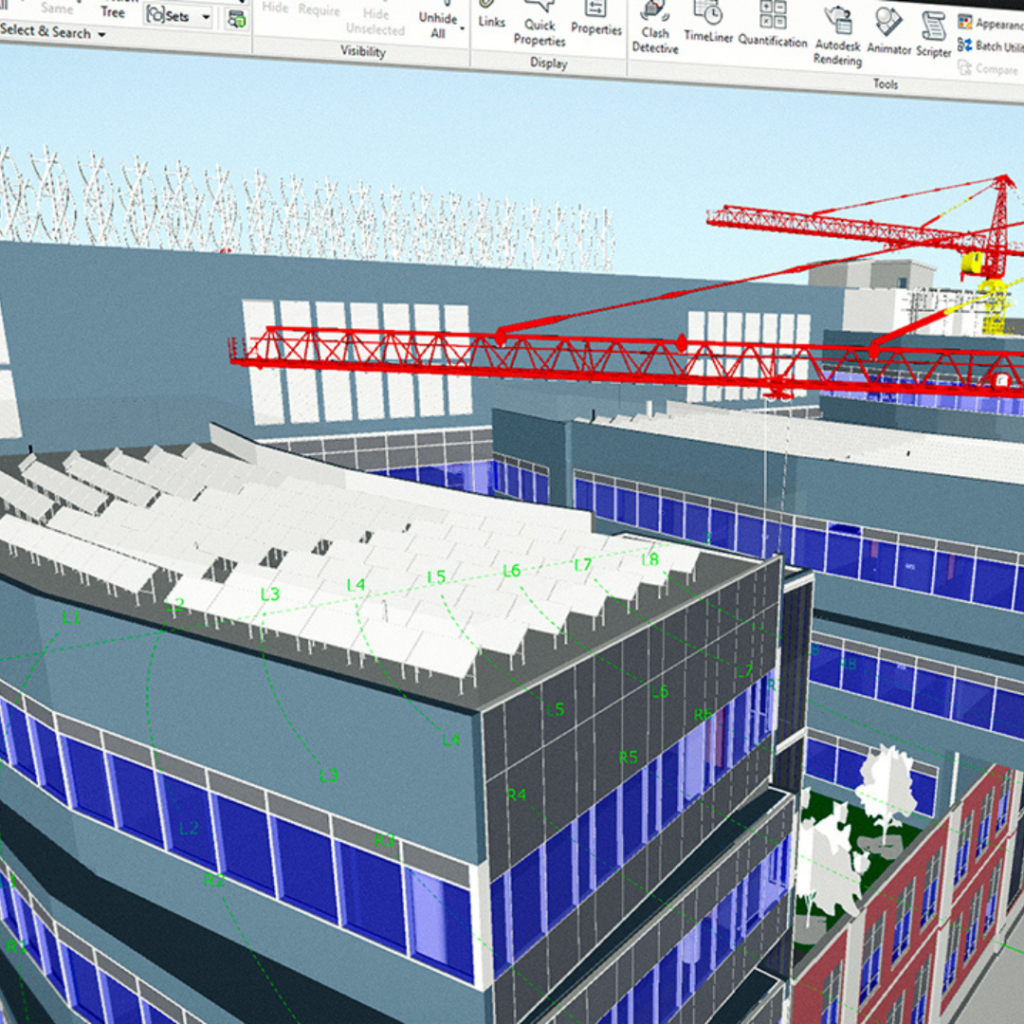
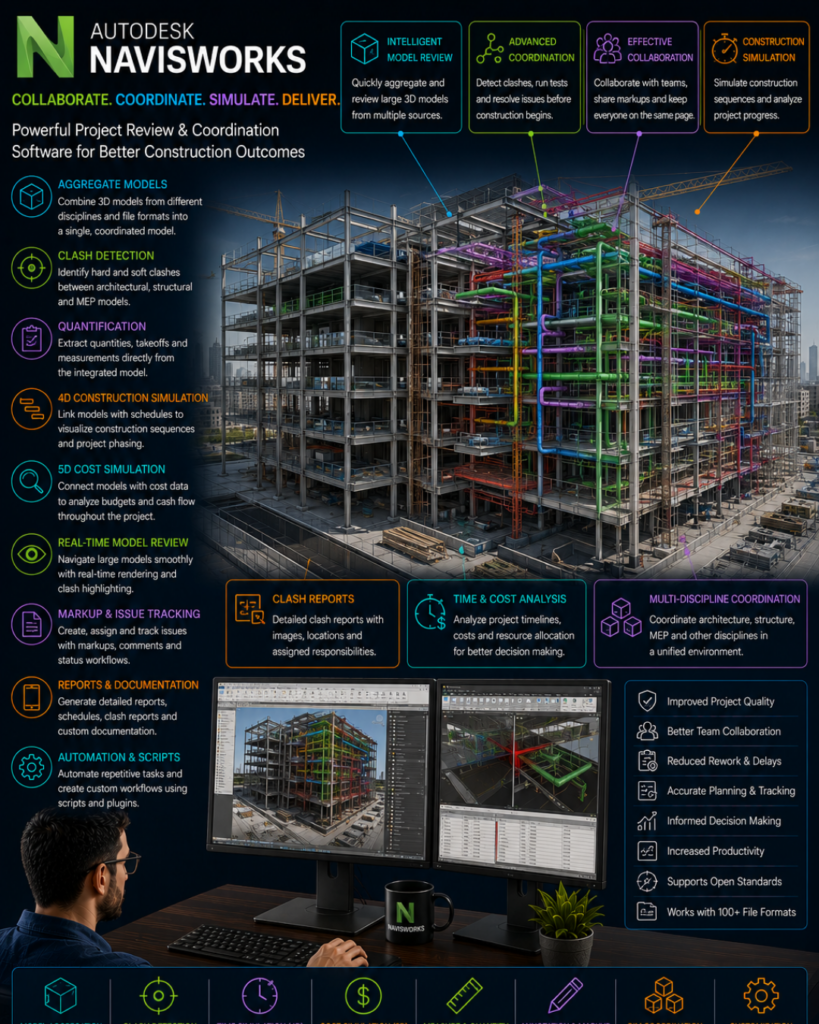
Navisworks is a powerful software tool used in the architecture, engineering, and construction industry to integrate multiple 3D models into one united model for streamlined collaboration. This software allows designers and construction professionals to detect potential clashes and errors before the actual construction begins, saving time and money. The Navisworks course helps professionals learn how to use this software effectively, including tasks such as integrating 3D models, creating walkthroughs, performing clash detection, and generating reports. Navisworks also supports files created in various file formats, such as AutoCAD, Revit, and SketchUp. Upon completion of the Navisworks course, participants are equipped with essential skills and techniques required to develop their own models, conduct complex simulations, and collaborate effectively with project stakeholders.
Caddesk Hyderabad is considered as the best Navis Works training institute due to their exceptional training methodology and industry-relevant curriculum. Their experienced trainers make use of practical training sessions to help students gain hands-on experience in using Navis Works software for design and modelling purposes. The institute also provides learners with access to the latest Navis Works software versions and tools, enabling them to stay abreast of advancements in the design industry. In addition, Caddesk Hyderabad also offers placement assistance to its learners and helps them develop soft skills such as communication and teamwork, making them job-ready. Overall, Caddesk Hyderabad’s unique training approach, expert trainers, and industry-relevant curriculum make it the top choice for Navis Works training in Hyderabad.
There are several advantages to taking a Navisworks course, including:
1. Improved skills: You’ll gain advanced skills in 3D modeling, simulation, and analysis of building designs, allowing you to work more proficiently with intricate building projects.
2. Increased productivity: You’ll learn how to use Navisworks to streamline your workflow, resulting in faster turnaround times without sacrificing quality.
3. Better collaboration: The software allows multiple stakeholders to collaborate on a project, which can streamline the design process and lead to better project outcomes.
4. Enhanced problem-solving: Navisworks’ advanced simulation tools enable you to identify and solve potential project issues before they occur, saving time and money.
5. Competitive edge: Having Navisworks skills sets you apart from other professionals in the field, making you more marketable to potential employers.
Caddesk Hyderabad offers an online Navis Works course that covers essential skills for professionals who want to become proficient in Navis Works software. The course consists of video lectures, hands-on practical exercises, and quizzes designed to improve learning outcomes. Participants gain an understanding of Navis Works interface, tools, and functionalities, including how to import models, run simulations, and generate reports. The course also covers topics such as file management, project collaboration, and data exchange. The online Navis Works course is suitable for architects, engineers, construction managers, and students who want to improve their skills for managing building information modeling (BIM) projects. Upon completion, students receive a certificate of completion from Caddesk Hyderabad.
Navisworks is a popular software used in the construction industry to manage project data and create 3D models. Career opportunities for individuals with Navisworks training include construction project managers, BIM managers, architectural and engineering technicians, and CAD technicians. These professionals can work in a variety of settings including commercial construction, infrastructure development, and home building.
There are also opportunities to specialize in different areas of Navisworks such as Clash Detection, Quantification, and Rendering. Individuals with Navisworks training can also pursue certification to further enhance their skills and make themselves more marketable to employers.
Overall, Navisworks training can provide individuals with a strong foundation in project management and 3D modeling, opening up a range of career opportunities in the construction industry.
Understanding the role of Navisworks in the construction workflow
Navigating the Navisworks interface and work environment
Importing and managing 3D models from various sources
Configuring settings for optimal performance
Reviewing and analysing 3D models in Navisworks
Utilising navigation tools for exploration and walkthroughs
Using selection and visibility tools for model isolation
Creating viewpoints and sections for better understanding
Merging and coordinating multi-disciplinary models
Performing clash detection for identifying conflicts and clashes
Analysing and resolving clashes in coordination with teams
Managing clash reports and communication
Extracting quantities and measurements from the model
Generating material takeoffs and cost estimates
Utilising quantification data for project estimation
Creating custom reports and documentation
Creating time-based simulations and animations
Visualising construction sequences and project phasing
Utilising the Animator for presenting construction progress
Exporting animated walkthroughs for communication
Coordinating clash resolutions with design teams
Implementing the “4D” workflow for clash management
Creating and managing issues and RFI tracking
Integrating clash resolutions into project updates
Collaborating on Navisworks projects with team members
Using BIM 360 and cloud-based platforms for collaboration
Sharing Navisworks files with stakeholders for review
Managing permissions and access control
Utilising laser scans and point clouds in Navisworks
Exploring advanced clash detection and rule sets
Integrating with other software (e.g., Revit, AutoCAD, etc.)
Managing large-scale projects with Navisworks Manage
Coordinating a multi-disciplinary construction project
Analysing and resolving clashes in an infrastructure project
Simulating construction progress for a complex building
Navisworks is a powerful BIM coordination tool used to review 3D models, detect clashes, simulate construction timelines, and improve project coordination across architecture, structural, and MEP disciplines.
This course is perfect for Civil Engineers, Architects, BIM Modelers, MEP Engineers, Construction Managers, and Revit users who want to specialize in BIM project coordination.
Absolutely! Navisworks works closely with Revit, helping students perform clash detection, model review, and construction scheduling, which Revit alone cannot handle fully.
You’ll learn:
Model navigation
Clash detection
Timeliner (4D simulation)
Quantification
Model merging
Coordination review
Rendering and animation walkthroughs
Export/import workflows with Revit & AutoCAD
Yes. Navisworks is widely used for project coordination, clash solving, pre-construction planning, and reducing onsite errors, making it a must-have skill for BIM jobs.
Yes! Students learn soft, hard, and clearance clashes, clash grouping, reporting, and solving clashes in coordination meetings.
Yes, the course includes construction sequencing using Timeliner, which helps students understand project planning and scheduling.
Not necessarily. Basic knowledge of Revit or any 3D modeling tool makes learning Navisworks much easier.
Yes. Students work on real-time building models, including architectural, structural, and MEP integration.
Definitely! Navisworks is one of the most required tools for roles like BIM Modeler, BIM Coordinator, Project Engineer, and QA/QC Engineer.
Yes. Students get help installing Navisworks Manage or Simulate, depending on their system.


We're here for you
Explore Our courses